OpenProfalux
One ESP32 and one CC1101 module driving two radio worlds from Home Assistant - Somfy RTS at 433.42 MHz, and KeeLoq 868 MHz shutters cloned from an existing remote, with no gateway and no manufacturer key. The lesson of the project - I chased an encryption key for days before finding out the motor simply accepts a replayed frame.
Code: github.com/Isno-Open/OpenProfalux
- Background
- The real knot: KeeLoq, and why I stopped caring
- Hardware identification
- Wiring, step by step
- How a frame is built
- The firmware
- Teaching it a remote
- Driving it, and the “press then stop” model
- Following the real remote
- Home Assistant
- Backup and updates
- Somfy RTS: the other band, and it works
- For the curious: what if we did want the key?
- What is next
- And if you would rather not wire anything
Background
A note for readers outside France, because the brand name in the title says little here. Profalux is a French manufacturer, and its shutters are essentially sold in France. The part of this article that travels is not the brand: it is the method, cloning a KeeLoq rolling code remote by capture and replay, which applies to a whole family of 868 MHz motors. And if you are reading this from the US, the UK, Germany or Australia, the section you probably came for is Somfy RTS, at 433.42 MHz, which is sold worldwide.
I have five Profalux roller shutters, driven by wall remotes and a multi channel “Noe” remote. They work very well, but they only ever talk to their own 868 MHz remotes. No official gateway to Home Assistant, no “close everything at sunset” scenario. I wanted them in my home automation without replacing the motors.
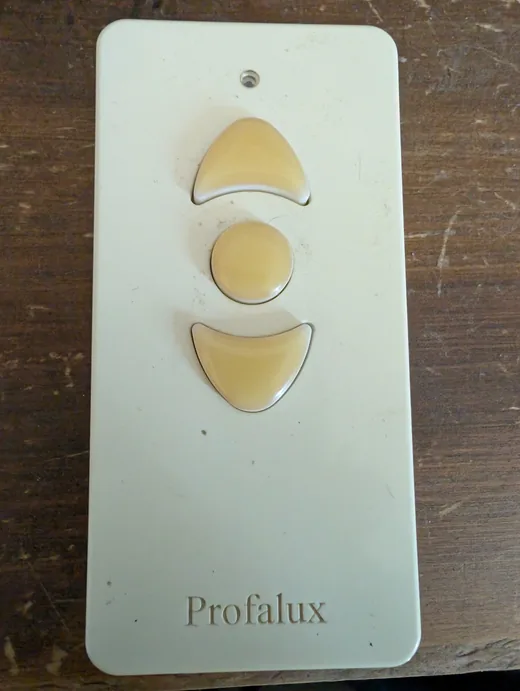
There were three roads:
- Wire an ESP behind each switch (=the l0ad/profalux2Esphome project does exactly that). Clean, but you have to pull wires into every shutter box, and it assumes a wired switch you can reach. My house is all radio.
- Buy a DEVMEL AirSend gateway, which officially knows how to clone Profalux. It works, but it is a proprietary box at around 150 EUR that goes through its own backend.
- Rebuild a radio remote with an ESP32 and a CC1101 module. No wires to pull, around 15 EUR of parts, and everything stays local. That is the road I took.
The real knot: KeeLoq, and why I stopped caring
Profalux remotes use KeeLoq (=the Microchip rolling code, the one in most garage door remotes). The principle: on every press a counter is incremented, it is encrypted with an encryption key derived from a manufacturer key, and the result (the “hopping code”, 32 bits that change every time) goes on the air. The receiver, which knows the key, decrypts, checks that the counter moved forward, and drives the shutter. Replaying an old frame is supposed to fail, since its counter is “already spent”.
So I did what everybody does: hunt the manufacturer key. Analysing a gateway firmware, key tables, decryption attempts against real captured frames, reading up on the slide / meet-in-the-middle attack on KeeLoq. Days of it. Nothing usable at hobby level, since getting that key takes either a leak or a physical side channel attack worth several hundred euros.
Then I tried the dumbest thing on the bench, the one I should have tried first:
replay a captured frame. I captured an “up” frame from my real remote, re-emitted it as is with the CC1101, and the shutter went up. Better still, it still works after using the real remote in between.
In other words, the Profalux motor does not enforce the anti replay counter rule. A captured frame stays valid. The whole cryptographic saga was beside the point for control: I need no key at all. The firmware clones a remote by plain capture and replay.
It is the kind of reversal that is annoying in the moment (=all that time on the crypto) and funny afterwards. The tell is that the simplest answer deserves to be tested before the cleverest one.
Hardware identification
There is nothing to tear down here, unlike reversing a module: we build the transmitter. Two parts.
- An ESP32. Any of them. I use an M5Stack ATOM Lite (=an ESP32-PICO in a finished case, around 11 EUR) because its whole bottom header is reachable with dupont wires, no soldering.
- A CC1101 868 MHz module. That is the sub-GHz radio transceiver. It talks SPI to the ESP32. I ruled out the EBYTE E07-900M10S (=too much fine SMD to hand solder) in favour of a classic little green module. The trap with those modules: the pads are on a 2 mm pitch (=not the 2.54 mm standard) and not even regular (=the row on the antenna side uses another pitch). A standard 2.54 header or breadboard will not fit. 2 mm pin headers do exist (=rarer), but I soldered the wires directly.
One trap at purchase time: CC1101 modules exist in 433 MHz and in 868 MHz, and the two look like twins. Profalux transmits around 868, so get the right band: a 433 module will receive nothing. The band marking is often tiny, hence the photo below of the exact module I use.
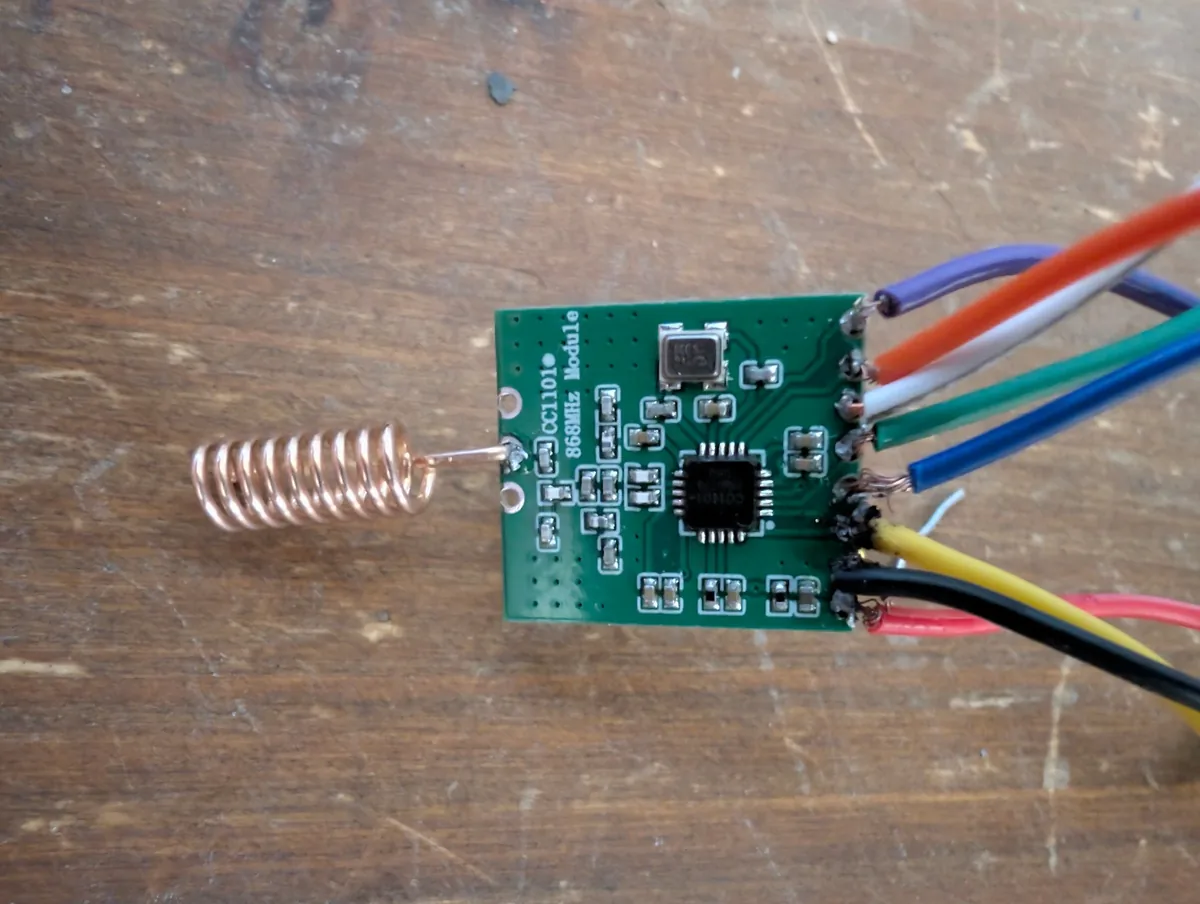
A small confession in passing: I am no soldering champion, and my tin blobs on the CC1101 pads are frankly ugly. A good part of the excuse is the module’s non standard 2 mm pitch (=see above): the classic 2.54 does not fit, and with no 2 mm header at hand I tinned the wires one by one straight onto the pads, by hand. It rarely ends up pretty, but it conducts, and that is all a solder joint is asked to do.
Wiring, step by step
The CC1101 connects to the ESP32 with six wires: the four SPI bus lines (MISO, MOSI, SCK, CS), plus GDO0 (=the pin that carries the radio data, mandatory), plus power.
⚠️ The CC1101 is a 3.3 V part. Never 5 V. Powering it from 5 V destroys it. On the ESP32, take the 3V3 rail, not 5V/VBUS.
On the M5Stack ATOM Lite, every signal is on the bottom header, which makes the wiring
solder free. Here is the mapping the firmware expects (=target m5stack), with a suggested
colour code so you do not get tangled:
| CC1101 signal | ATOM Lite pin | Wire colour |
|---|---|---|
MISO | G33 | 🟢 |
MOSI | G23 | 🟡 |
SCK | G19 | 🔵 |
CS (=CSN) | G22 | ⚪ |
GDO0 | G25 | 🟠 |
GDO2 (=optional) | G21 | 🟣 |
3V3 | 3V3 | 🔴 |
GND | GND | ⚫ |
Physical pinout of the little green module: the silkscreen prints the name of every
pad. On mine, the left edge reads, top to bottom, Vcc, GND, MOSI, SCLK, MISO,
GDO2, GDO0, CSN; the right edge (antenna side) only has GND, ANT, GND:
  left edge                right edge (antenna side)
  ─────────────            ─────────────────────────
  Vcc   (red)              GND
  GND   (black)            ANT   <- spring / U.FL
  MOSI  (yellow)           GND
  SCLK  (blue)    [ CC1101 ]
  MISO  (green)
  GDO2  (purple, optional)
  GDO0  (orange)
  CSN   (white)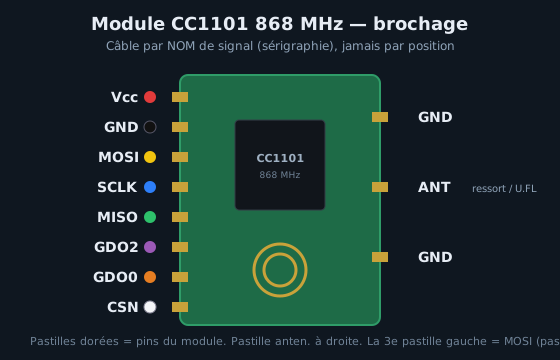
⚠️ Always wire by signal NAME, never by counting positions. Pad order changes from one
module to the next: here the 3rd pad from the top is MOSI, not CS. So the white wire
(CS) goes to the pad marked CSN, wherever it sits on your unit. SCLK = SCK.
Read the silkscreen on your module before soldering. That is the point a reader on the
HACF forum rightly raised.
If you use a classic ESP32 DevKit instead (=target external), the firmware expects
the VSPI bus: MISO 19, MOSI 23, SCK 18, CS 5, GDO0 4, GDO2 2.
Classic trap: on many CC1101 breakouts, GDO0 is not aligned with the obvious
silkscreen. It is the data pin, so if nothing is captured, it is the first wire to check
again. GDO2 is optional (=debug) and can be left unconnected at first.
For the antenna, a stiff 8.6 cm piece of wire (=quarter wave at 868 MHz) soldered to the antenna pad is enough for desk testing. To cover the house, a real 868 antenna on a connector improves range a lot.
How a frame is built
A Profalux frame is plain KeeLoq, an encoder of the HCS3xx family (the 66 bit word is its signature). On the SDR, my carrier sits at 868.425 MHz, modulation OOK (=on/off keying: the carrier is either present or absent), with a basic element T_E of about 455 µs. On the air, in order:
- A preamble: about twenty short alternations (=~455 µs each) that wake the receiver up and lock its clock.
- A header: a long silence of about 4.4 ms marking the start of the data.
- The code word: 66 bits, each bit encoded by the duration of the high/low level (=bit period ~1365 µs, that is 3·T_E).
The 66 bits break down as follows:
| Field | Bits | Role |
|---|---|---|
| Hopping code | 32 | the encrypted part, changes on every press |
| Serial number | 28 | remote identifier, in clear |
| Button | 4 | down 0x01, stop 0x02, up 0x04 |
| Status | 2 | low battery (VLOW) and repeat (RPT) |
The only encrypted part is the hopping code (=32 bits). Inside it, once decrypted with the key, you find a 16 bit counter incremented on every press, part of the serial number (=10 bits, the “discrimination”), the button code and 2 overflow bits. That encrypted counter is what makes the rolling: impossible to predict without the key. The rest of the frame (=serial, button, status) is in clear.
A detail that matters for position: the RPT bit marks a hold. When you keep your finger down, the remote repeats the same frame (=same hopping code, frozen counter, RPT set to 1). The counter only increments on release followed by a new press.
None of this is needed to use the firmware (=it captures and replays the bits as they are), but it helps to understand what goes on, and it matters for the next section.
The firmware
The code lives at github.com/Isno-Open/OpenProfalux,
in the firmware/ folder. It is ESP-IDF (=the native Espressif SDK, not Arduino, not
ESPHome).
Build (=through Docker, nothing to install locally):
docker run --rm -e IDF_TARGET=esp32 -v "$PWD":/project/firmware -w /project/firmware \
  espressif/idf:v6.1 bash -c "idf.py set-target esp32 && idf.py build"
Flash and serial monitor:
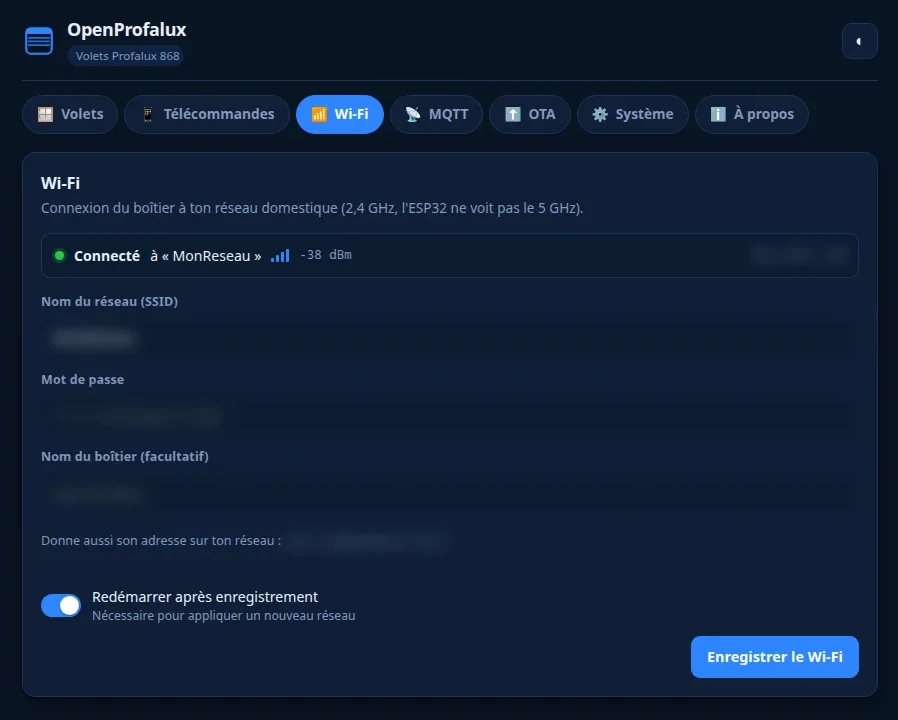
idf.py -p /dev/ttyUSB0 flash monitorFirst boot. The module has no Wi-Fi configured yet, so it opens its own access point:
- A Wi-Fi network
OpenProfalux_XXXXshows up (=XXXXis the tail of the MAC), open (=no password, you just connect). - Connect to it, open
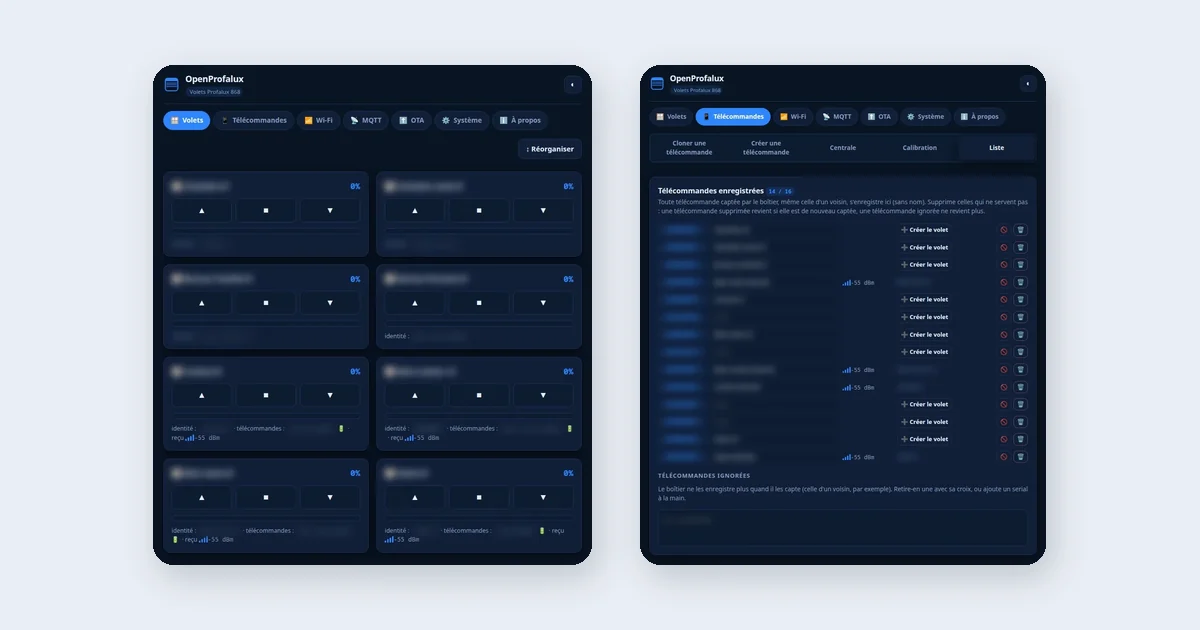
http://192.168.4.1. Wi-Fi tab: your router SSID and password, and a name for the box (=leave the password empty if your network is open, for instance an SSID using MAC authentication). MQTT tab: broker address, with a “detect broker” button that looks for Mosquitto over mDNS and fills the field by itself. - Save and reboot. The module joins the router over Wi-Fi and connects to MQTT.
Teaching it a remote
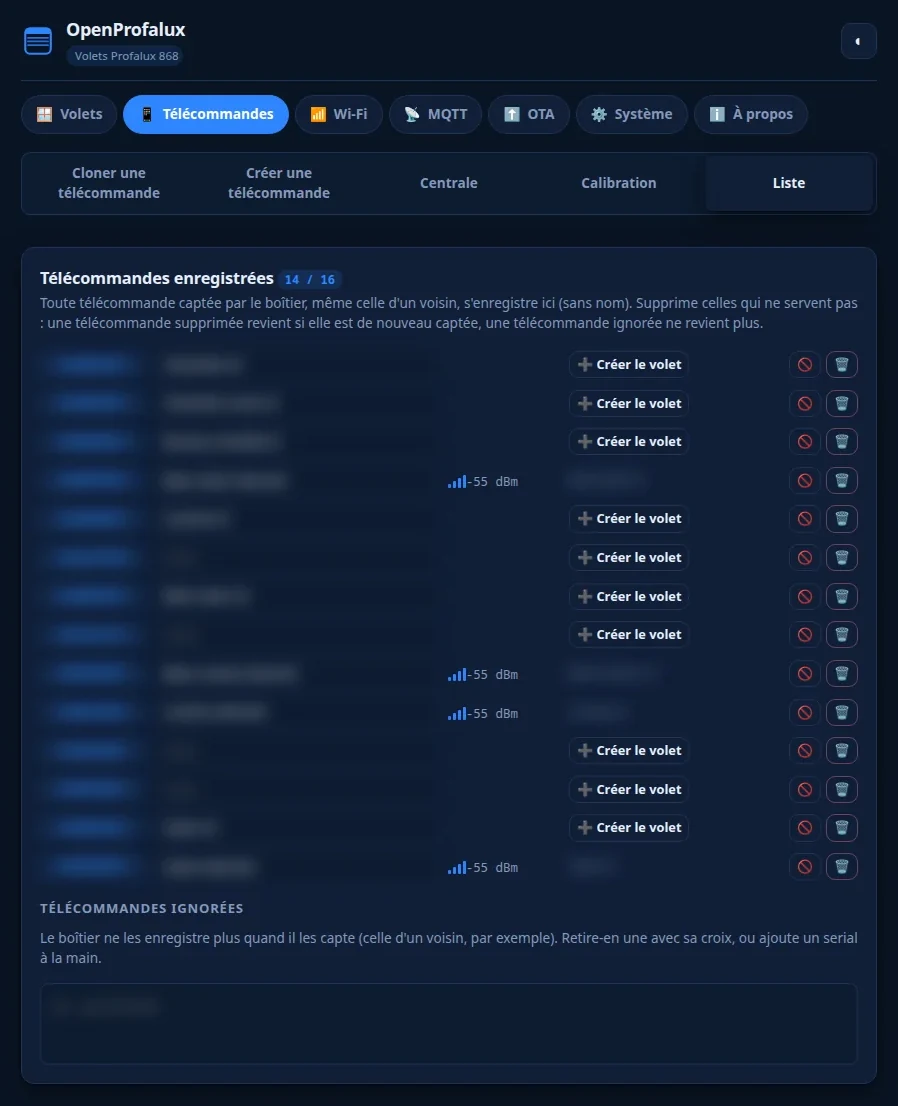
This is the heart of the clone. Remotes tab, Clone sub tab:
- Pick the action to record (=up, stop or down).
- Click Listen, then press the matching button on the real physical remote once.
- The captured frame is displayed (=serial number, button, signal strength). Give the remote a name (“bedroom wall”), and assign the frame to a shutter.
Repeat for the three actions. A shutter can have several remotes (=the wall one and the multi channel Noe): just capture each of them, and the firmware remembers every serial number that drives that shutter.
Driving it, and the “press then stop” model
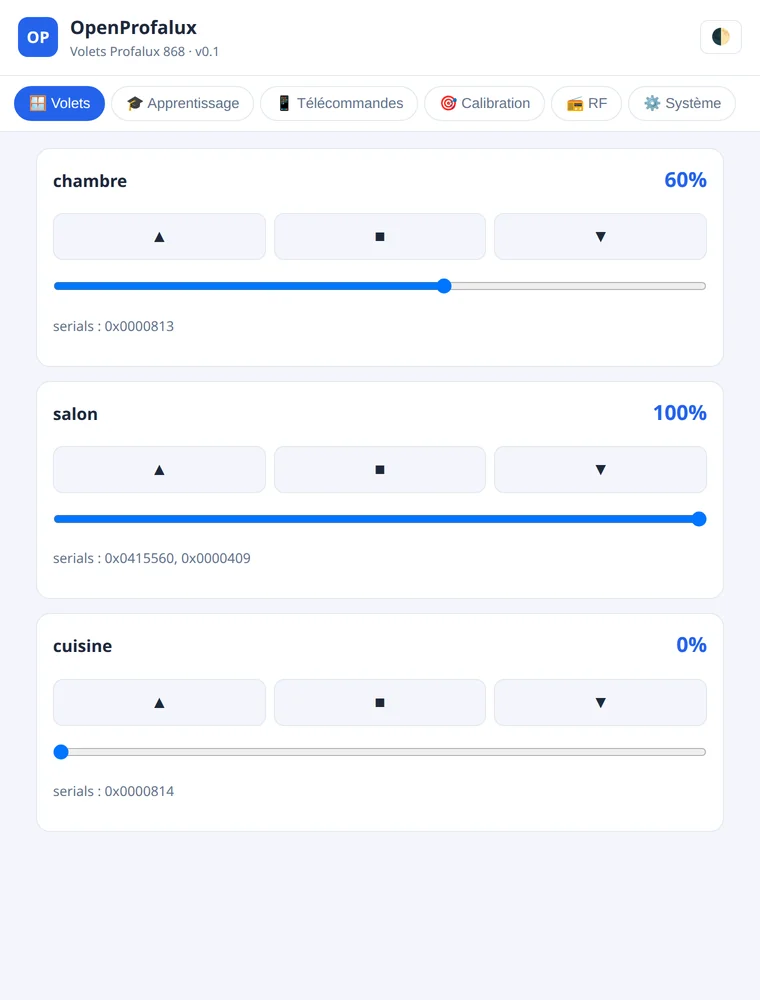
A Profalux subtlety that changes the position logic: this is not a hold. You tap up, the motor runs to the top on its own, and you tap stop when you want it to stop. So the position of a half open shutter is the time between the up press and the stop press.
The firmware reproduces exactly that:
- The up / stop / down buttons replay the matching captured burst.
- A position slider (=0 to 100 %) asks for a position: the firmware knows how long a full travel takes (=timed under Remotes > Calibration), starts the motor and sends stop by itself at the right moment.
Since there is no feedback from the motor (=we transmit, we do not read its real position), the percentage is a time based estimate. It drifts a little and realigns itself as soon as the shutter goes all the way (0 % or 100 %). For a shutter, that is plenty in daily use.
Following the real remote
If someone uses the physical wall remote, the firmware listens too and updates the position in Home Assistant: it sees the up frame go by (=the shutter heads to the top) and the stop frame (=it freezes the estimated position where it stopped). For that to work, the remote must have been learned (=its serial number is known to the shutter).
Home Assistant
Once MQTT is configured, every learned shutter shows up in Home Assistant on its own as a cover entity (=through MQTT discovery): open, close, stop, and a percentage position. No YAML to write on the HA side.
Backup and updates
Two safety nets I insisted on having:
- Backup: the System > Backup tab exports a JSON file with the remote names, the reference frames and the calibration. If the ESP32 is wiped or replaced, you restore everything in one click. Since control rests entirely on those captured frames, this is the thing not to lose.
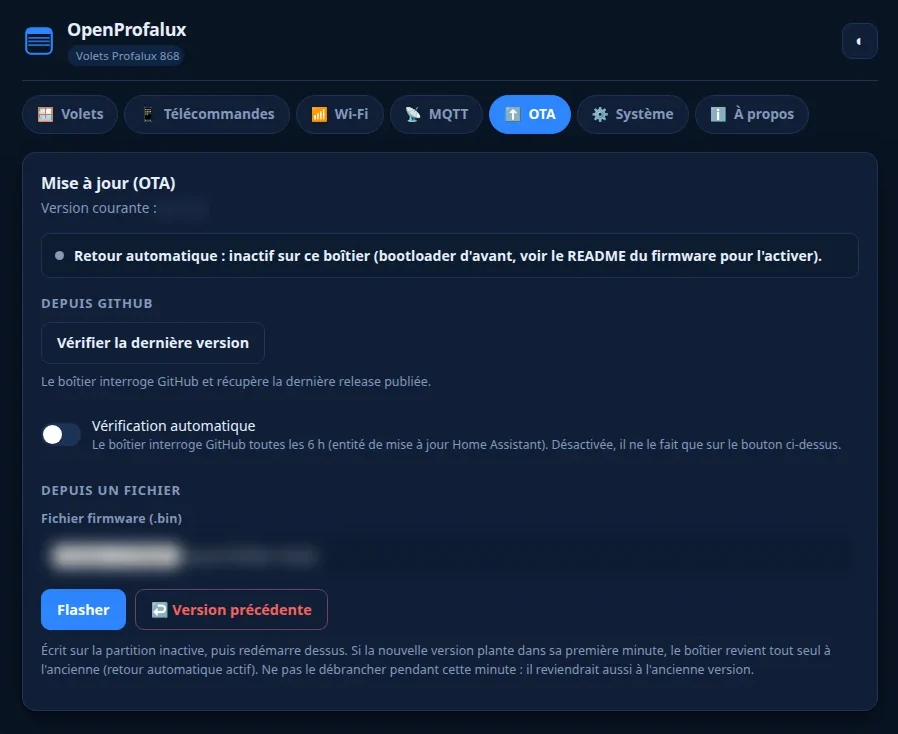
- OTA: the OTA tab updates the firmware from the browser (=upload of the
.bin), or from a URL, with automatic rollback if the new firmware fails to boot.
Somfy RTS: the other band, and it works
Profalux transmits around 868 MHz. Somfy RTS transmits at 433.42 MHz. Plenty of houses have both, because you inherit one brand’s shutters and add another brand’s awning or external venetian blind ten years later. Two protocols, two bands, and until now two boxes.
Since v0.2.14, the firmware speaks both. A Somfy tab next to the Profalux shutters, and the same board drives both brands.
RTS was within reach for one simple reason: it is publicly documented. The frame format, the 16 bit rolling code, the rotating key: all of it has been described and reimplemented by several open projects, among them ESPSomfy-RTS, whose encoding method I reused as is. No manufacturer key to hunt down, unlike what I believed for Profalux.
The detail that unlocked everything: 56 or 80 bits
An external venetian blind refused to run its full travel. My first versions sent the standard format, 56 bits, and the blind moved in jerks. A radio capture showed that the original remote transmitted 80 bits: the standard 56, plus three extension bytes per command.
My initial assumption was that the motor simply wanted “more frames”. It was wrong, and a test said so: repeating the same 56 bit frame changed nothing. Changing the format made the travel work on the first click, both directions, with a clean stop. A cause you have not measured is a cause you invented.
And the next observation explains why both formats exist, which matters far more than having them:
56 bits is the wheel (=slat orientation). 80 bits is the buttons (=the full travel). The format does not tell you how good the motor is, it tells you which control on the remote you are imitating.
So the setting is per shutter in the Somfy tab: 56 bits by default for a standard roller shutter, 80 bits for a motor with orientable slats. It is not a setting to guess at, it follows the type of shutter.
What is proven, and what is not
Proven, on a real installation and not on my own bench: a Somfy J4 WT motor (=ref. J406 1TN, external venetian blind) behind a Soliris Mod/Var Slim Receiver RTS, installed in 2012. Up, down, full travel on a single click, and stop.
Not proven: the rest of the Somfy catalogue. One report is not compatibility. The compatibility table in the repository carries a single Somfy line today, and it will say so when there are more. Driving both radios in parallel on a single board also remains to be done, tracked in the open (#95).
A word to avoid a common confusion, especially outside France: RTS and io-homecontrol are not the same thing. RTS is one way, documented, and a single CC1101 is enough, which is exactly why it works today. io, found on Velux units and recent Somfy gear, is two way and hops frequency; a single transceiver is probably not enough for it, and I am still looking for hardware to settle that (#87). So do not read this section as “it works with every Somfy”.
For the curious: what if we did want the key?
Replay is plenty for control, but the crypto question stays entertaining. Two real roads exist to recover a remote’s encryption key, should the urge ever strike.
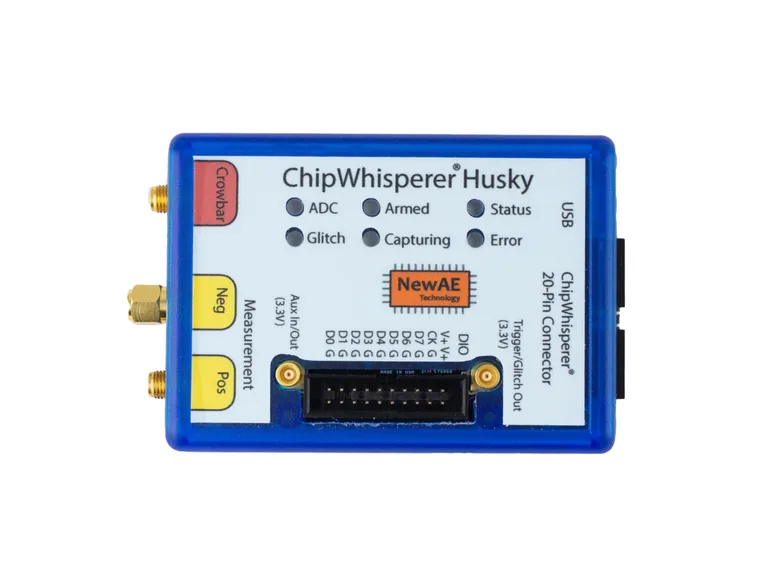
1. The side channel attack (DPA / CPA). On every frame received, the KeeLoq receiver decrypts. During that computation, its power consumption leaks information about the key. By measuring that consumption finely during decryption, then correlating over all subkey hypotheses, you recover the full key in a few hundred traces (=Differential / Correlation Power Analysis). The reference hardware for this is a ChipWhisperer (the Husky, or the more affordable Nano to get started). It is the clean, reliable method, but it requires physical access to the circuit you probe.
2. The slide / meet-in-the-middle attack (=Indesteege et al., 2008). Purely mathematical, on the radio frames, without touching the hardware. It exploits the structure of KeeLoq (=528 rounds of a very simple function) but demands a lot of known plaintext pairs, on the order of 2^16 frames from the same remote, for a final complexity around 2^44.5. Feasible on a good GPU, but you first have to collect a great many distinct hopping codes.
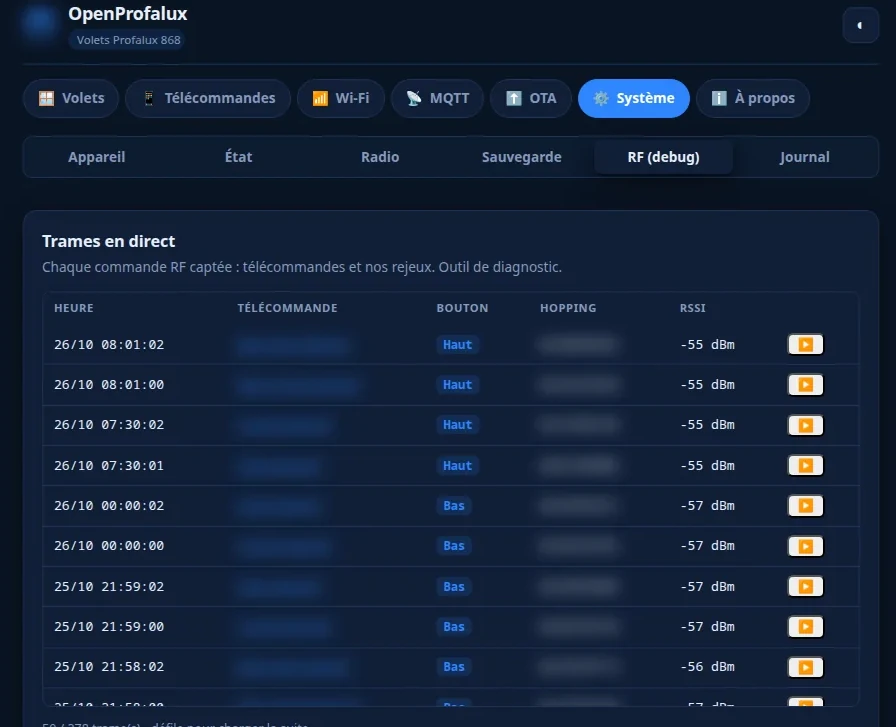
And that is exactly why the firmware has a “capture every frame” option. When enabled, each distinct frame received is published over MQTT and deduplicated by serial number. Over weeks, that quietly accumulates the hopping code dataset that would feed a slide attack. It is a door left open for later, disabled by default, and completely useless for control.
What is next
What is done: the firmware builds (ESP-IDF v6.1, around 1.1 MB), Profalux shutters are in use by users (enrollment confirmed on NeoSol S300, MOT-PX3R10, FranciaFlex M4G), and Somfy RTS (433 MHz) is emitted (PROG pairing, control; see the repo README). What remains to be validated on the full installation:
- fine calibration of travel times on my five shutters,
- antenna range from where the ESP sits,
- behaviour with the multi channel Noe remote.
And if you would rather not wire anything
Everything above works with an off the shelf ESP32 and a CC1101 module worth a few euros. That is the point, and the firmware will stay open: nothing in this project depends on a purchase.
But eight dupont wires in a case age badly. So I am having two boards made that integrate everything from the start, ESP32-S3, CC1101 radio, SMA antenna on a connector, USB-C power and ESD protection:
- the RF868, single band, designed for this project precisely;
- the Super, dual band 433 + 868, for those who also have Somfy gear or a pellet stove.
Same firmware as above, no wiring to do. The prototypes have arrived and pre-orders are open on isno.fr.
Parts
-
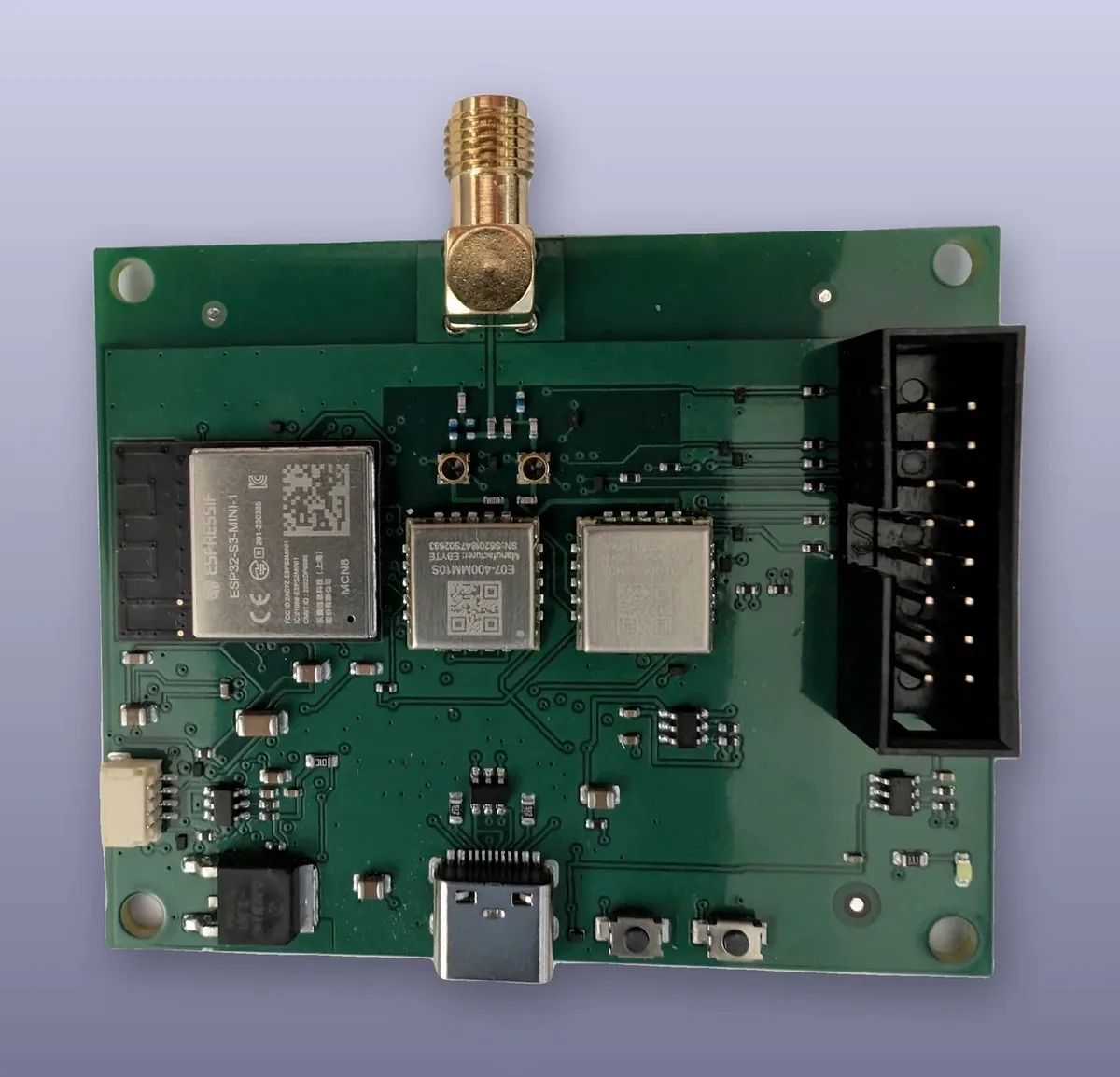 ISNO Super board 69.90 EUR
Two sub-GHz radios (433 + 868 MHz), each on its own RP-SMA connector. ESP32-S3, Qwiic and mikroBUS, USB-C. For open radio firmware. With OpenProfalux: Profalux (868 MHz) and Somfy RTS (433 MHz) today, more brands over releases.
- ◨
Any ESP32 will do. The M5Stack ATOM Lite is convenient because its whole bottom header is reachable with dupont wires, no soldering, and it fits in a very small finished case.
- ◨CC1101 868 MHz radio module ~3-5 EUR
Sub-GHz transceiver. Make sure you get the 868 MHz variant (=not 433, or nothing will be received). Watch out, on those little green modules the pads are on a 2 mm pitch (=not the 2.54 mm standard) and not even uniform (=the row on the antenna side uses yet another pitch). Standard 2.54 headers and breadboards will not fit; 2 mm pin headers do exist but are rarer, and I ended up soldering the wires straight onto the pads. 3.3 V only.
- ◨868 MHz antenna ~2 EUR
A plain 8.6 cm piece of wire (=quarter wave at 868 MHz) is enough for short range testing. A helical antenna on an SMA or u.FL connector improves range across the house a lot.
AliExpress - ◨Female-female dupont wires ~3 EUR
Six wires to connect the CC1101 to the ESP32 over SPI, with no soldering on the M5Stack. A 40 wire kit.
AliExpress / Amazon
Prices as observed at the time of the project. No affiliate links, I earn nothing.