OpenXtraflame
Complete reverse engineering of the Extraflame Black Label T009_3 Wi-Fi module, to replace its dependency on the Italian Omnyvore cloud with local control over MQTT.
Code: github.com/Isno-Open/OpenXtraflame
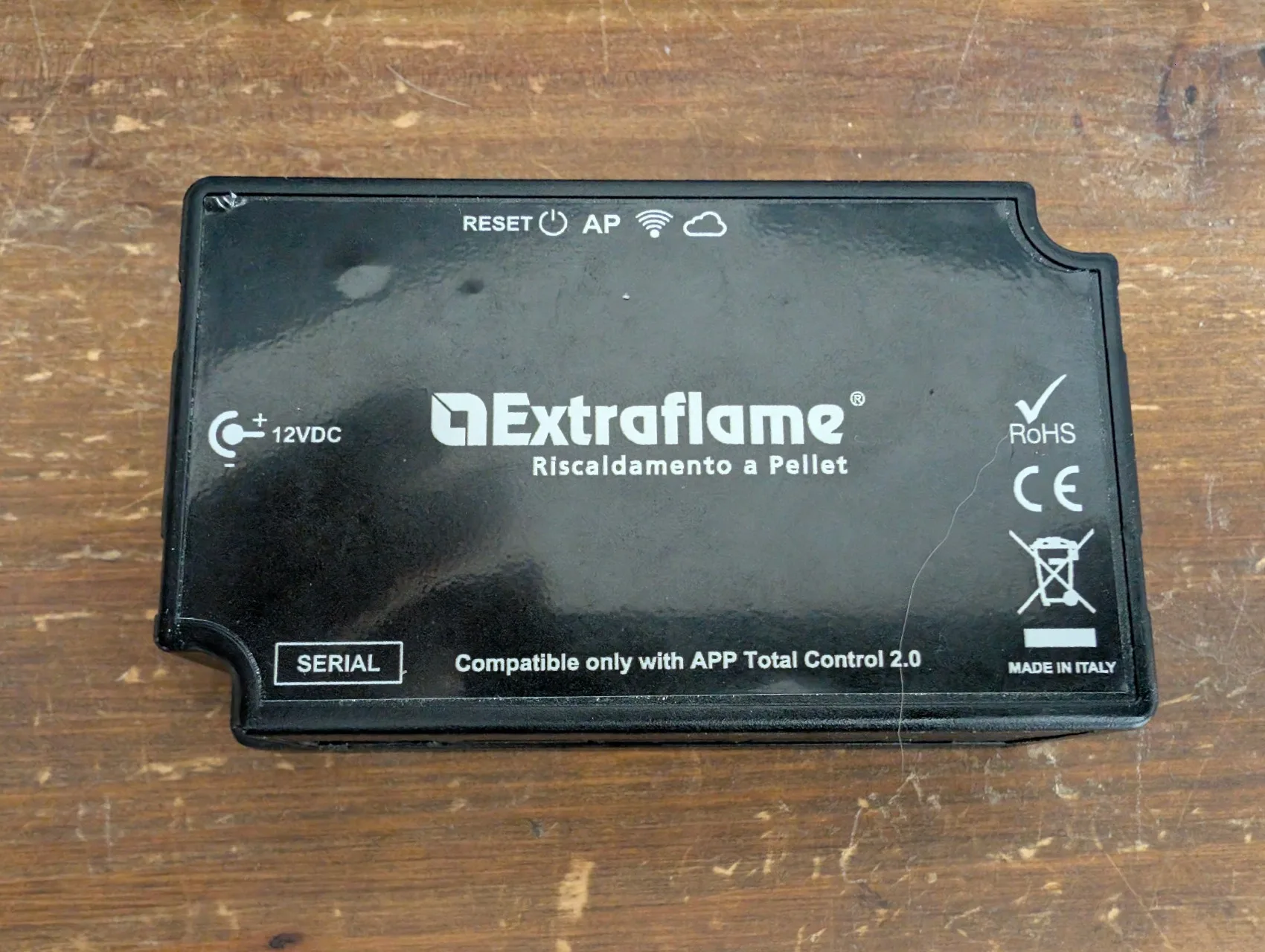
Context
The Extraflame Teodora Evo pellet stove is controlled remotely through the official Total Control 2 mobile app (published by Extraflame on iOS and Android). Under the hood, an ESP32-based Black Label T009_3 Wi-Fi module talks to a proprietary cloud backend hosted by Omnyvore srl. The module sells for 289 € incl. VAT at Extraflame and had never been reversed publicly.
Two problems justify the effort:
- No official Home Assistant integration.
- If Omnyvore shuts down tomorrow, my stove loses its remote control.
The existing community projects (philibertc/micronova_controller, Jorre05/micronova) work around the problem by wiring an external ESP to the stove’s serial bus. Elegant, but the original module stays next to it and keeps talking to the cloud. Goal: reflash the original module to keep everything in place, with no visible modification.
Command glossary
A recap before the details. What every tool invoked further down does, with the real arguments used.
Identify the chip:
python -m esptool --port COM3 --before no-reset --after no-reset chip-idReturns ESP32-D0WDQ6 rev v1.0 here and confirms the UART wiring works. --before no-reset / --after no-reset keep esptool from attempting a DTR/RTS reset that would take the module out of its manual download mode.
Read the chip’s protections (before dumping):
python -m espefuse --port COM3 summaryShows the eFuses: FLASH_CRYPT_CNT (flash encryption), ABS_DONE_0/1 (Secure Boot), UART_DOWNLOAD_DIS, JTAG_DISABLE. Critical step: if the flash were encrypted, the dump would be unusable binary noise.
Full 4 MB dump:
python -m esptool --port COM3 --baud 460800 --before no-reset --after no-reset read-flash 0 0x400000 dump.binReads the 4 MB of flash in one pass at 460,800 baud (about 100 s). This is the original firmware, to be locked away before anything else.
Restore from the dump:
python -m esptool --port COM3 --baud 460800 write-flash 0 dump.binSafety line: at any time, this puts the module back in factory state.
Full erase before the first custom flash:
python -m esptool --port COM3 --baud 460800 erase-flashErases the whole flash (partition table, apps, NVS, everything). Do it once before flashing the custom firmware, to start clean.
Set the ESP-IDF target:
idf.py set-target esp32Configures the project to build for the classic esp32 chip (as opposed to esp32s3, esp32c3, and so on).
Build for the M5Stack ATOM Lite (devkit validation):
idf.py -DOPENXFLAME_TARGET=external buildBuild for the Extraflame Black Label module (production):
idf.py -DOPENXFLAME_TARGET=blacklabel buildFlash and open the serial monitor:
idf.py -p COM3 -b 460800 flash monitorWrites the binary to the chip, then shows the live logs. On Linux replace COM3 with /dev/ttyUSB0.
Serial monitor only:
screen /dev/ttyUSB0 115200            # Linux
python -m serial.tools.miniterm COM3 115200   # Windows
On Linux, quit with Ctrl-A K. On Windows, PuTTY in Serial mode does the job too.
Extraction
Hardware identification
Module disassembled. Green double-sided PCB with the COD.T009_3 silkscreen. Components identified under a loupe.
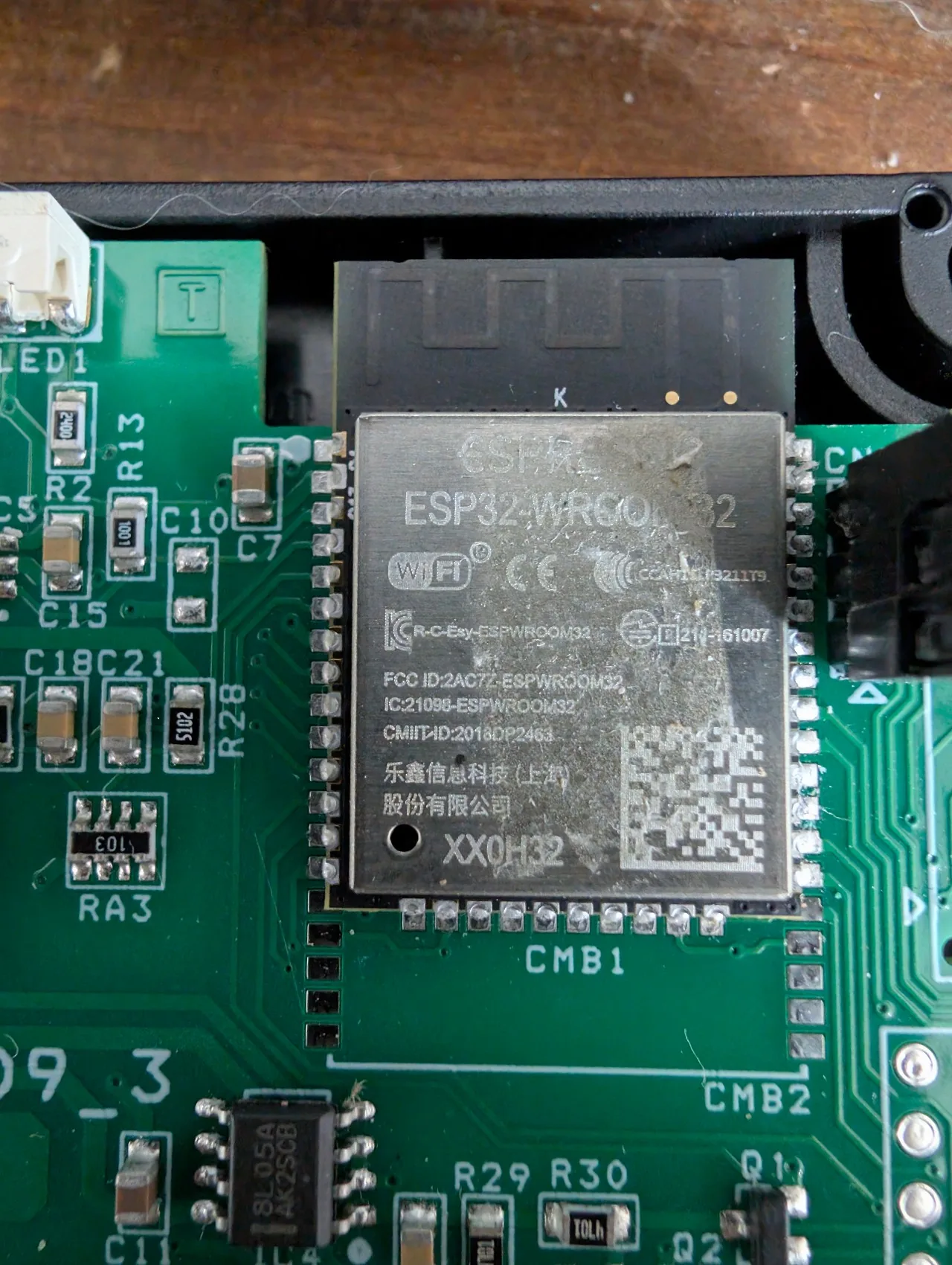
In the middle: the ESP32-WROOM-32 module (Espressif dual-core Xtensa LX6). This is the brain, and the part we are going to reprogram. Around it:
- Transformer T009-3-A, isolated power supply
- IC3 R173720, probably a 3.3 V regulator
- IC4 8L05A AK2SCB, linear 5 V to 3.3 V LDO
- 4 white SMD LEDs and a tactile reset button (photo below)
- SERIAL connector, 4 pins (power plus UART to the stove)
- CN5 connector, the early mystery, explained later
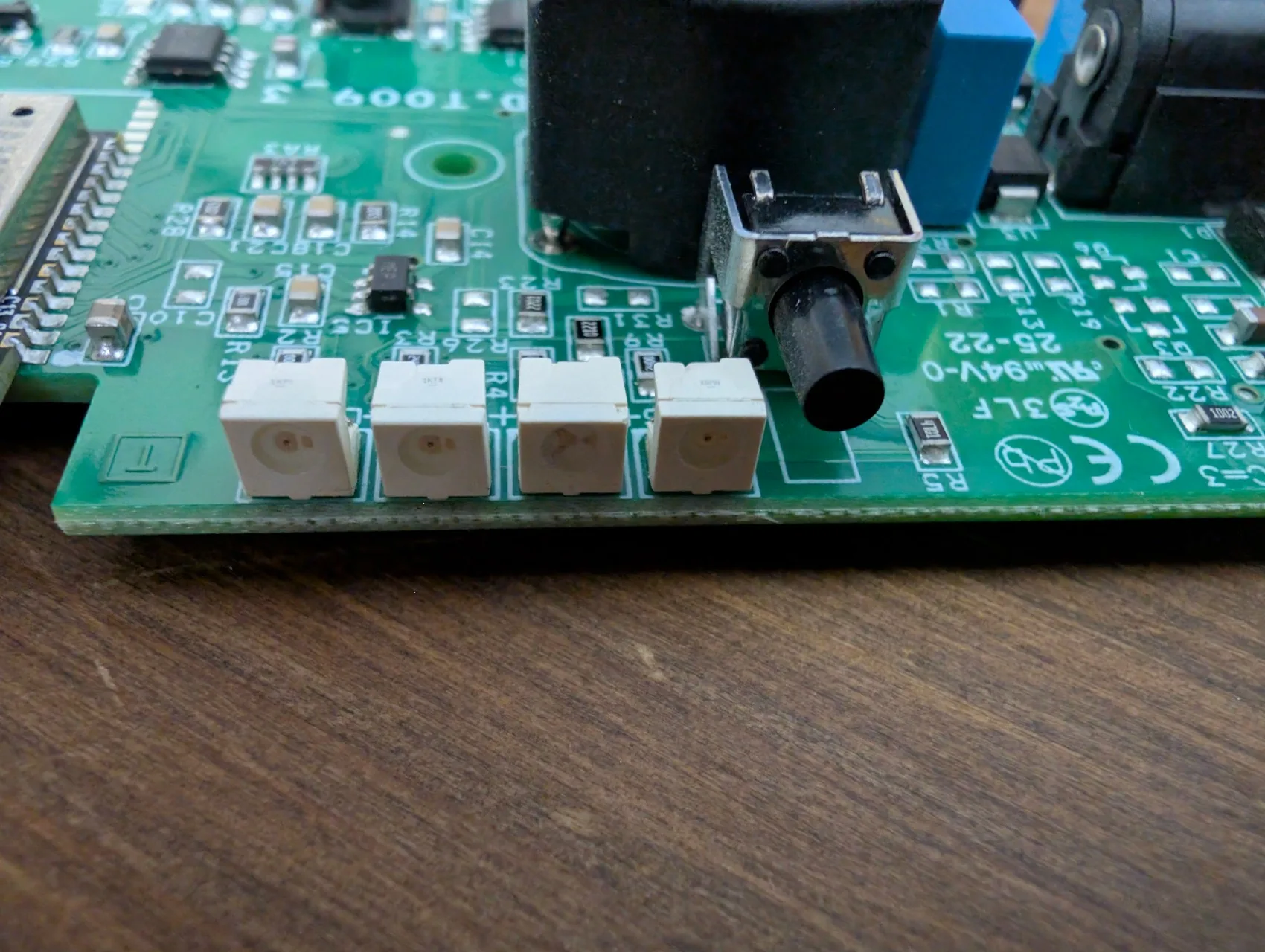
No JTAG connector and no debug pad identified. The UART pads and IO0 (needed to put the chip into ROM UART boot mode) are not exposed on the surface. We will have to go straight to the ESP32 pins.
Step-by-step wiring (beginners welcome)
Good news: no soldering required. The module has an accessible 3-pin serial connector (the one that links it to the stove) and one exposed pin, which is enough to extract the whole firmware. Female Dupont wires held against the pins do the job. If you are new to this, test on an M5Stack ATOM Lite first (same ESP32 family, finished case, about 12 €): same procedure, less risk.
1. Identify the TWO connectors on the module
The module has two distinct connectors that must not be confused:
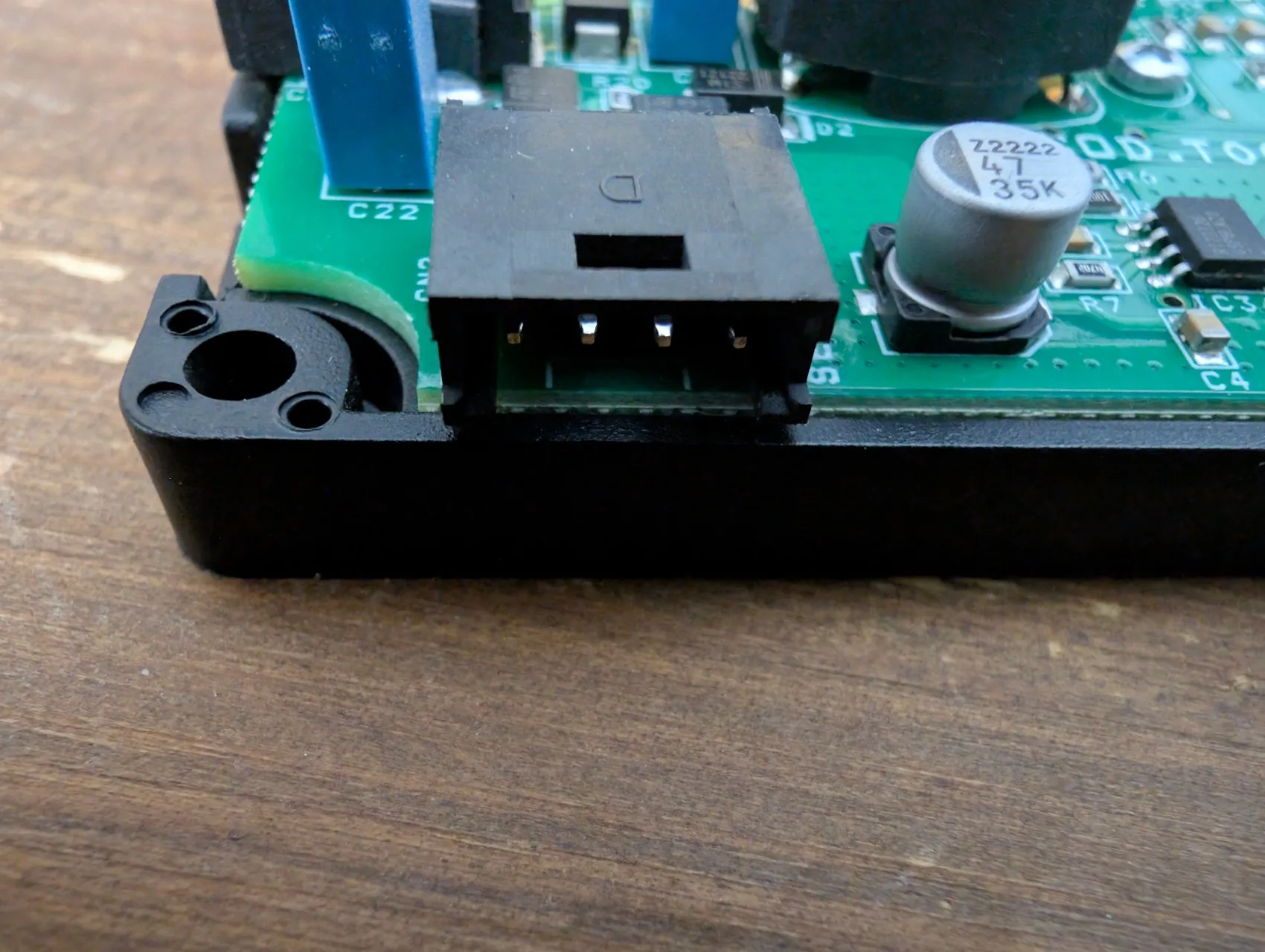
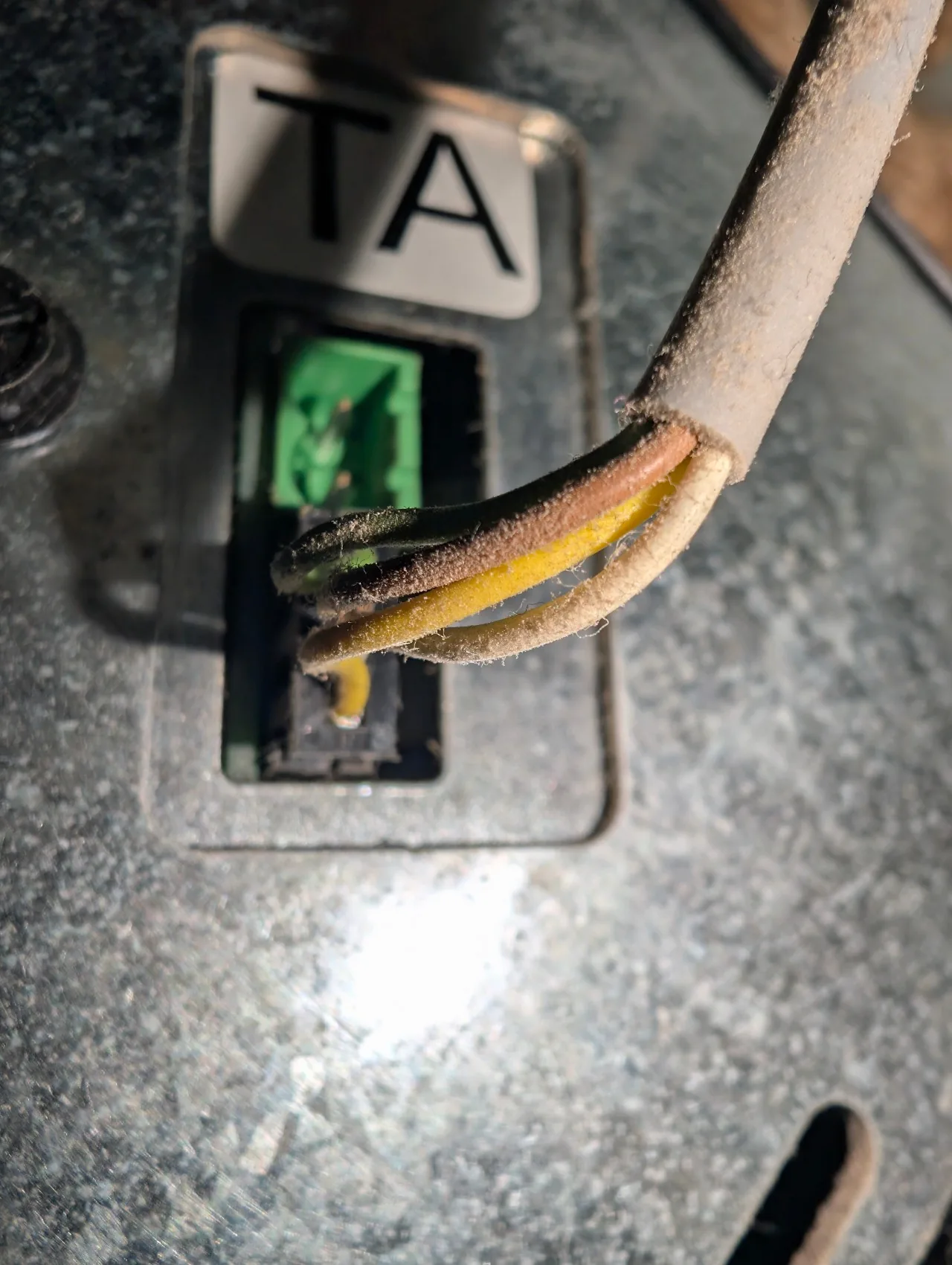
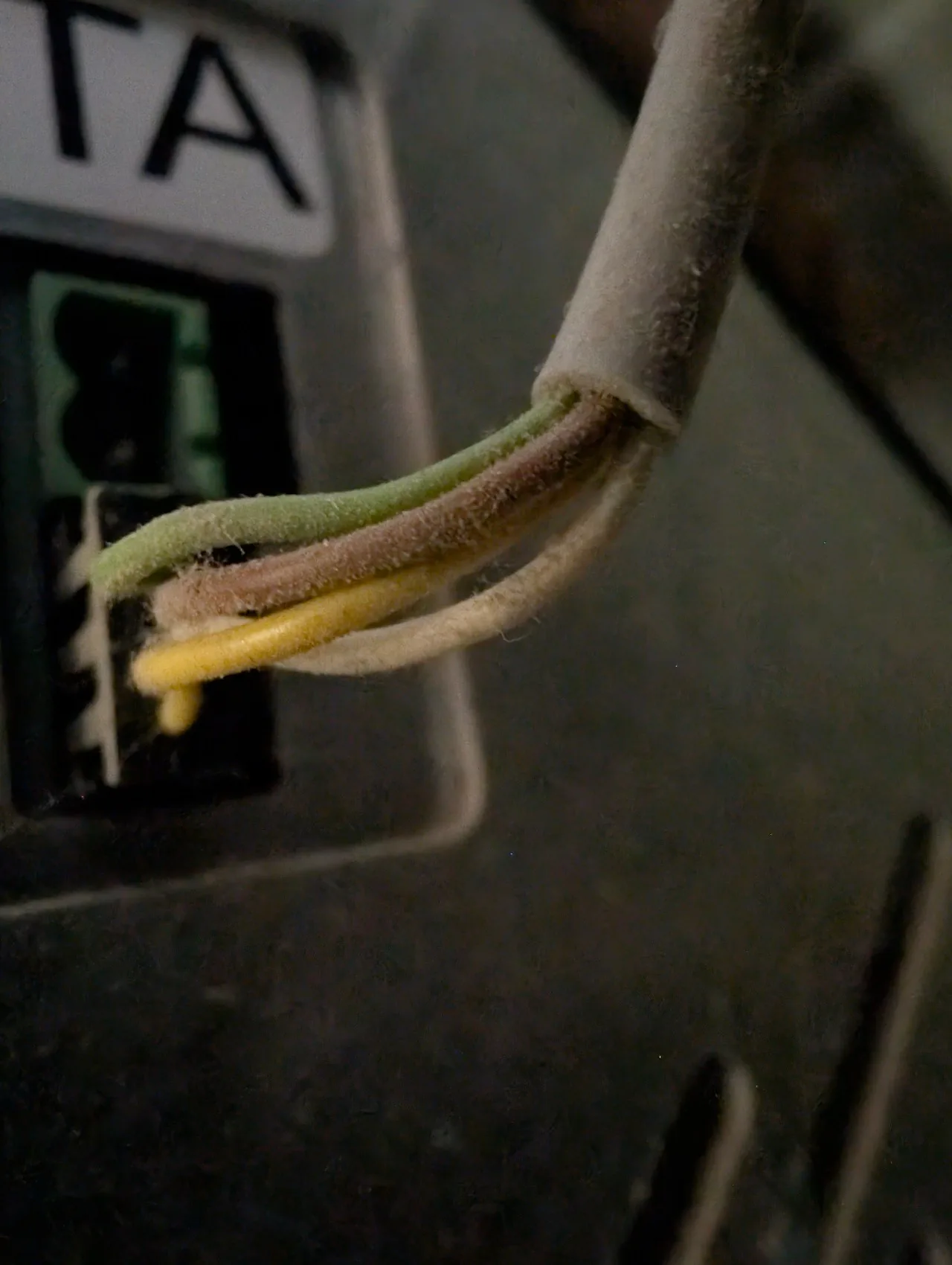
CN2, the 4-pin connector on the PCB edge. It links the module to the stove through a 4-wire cable (green, brown, white, yellow). It carries power and the communication with the stove. We do not plug into it to dump.CN5, the 3-pin header right next to the ESP32. It is the debug connector Extraflame left in place (probably for factory programming). This is the one we use for the dump.
CN2, the stove connector (4 pins):
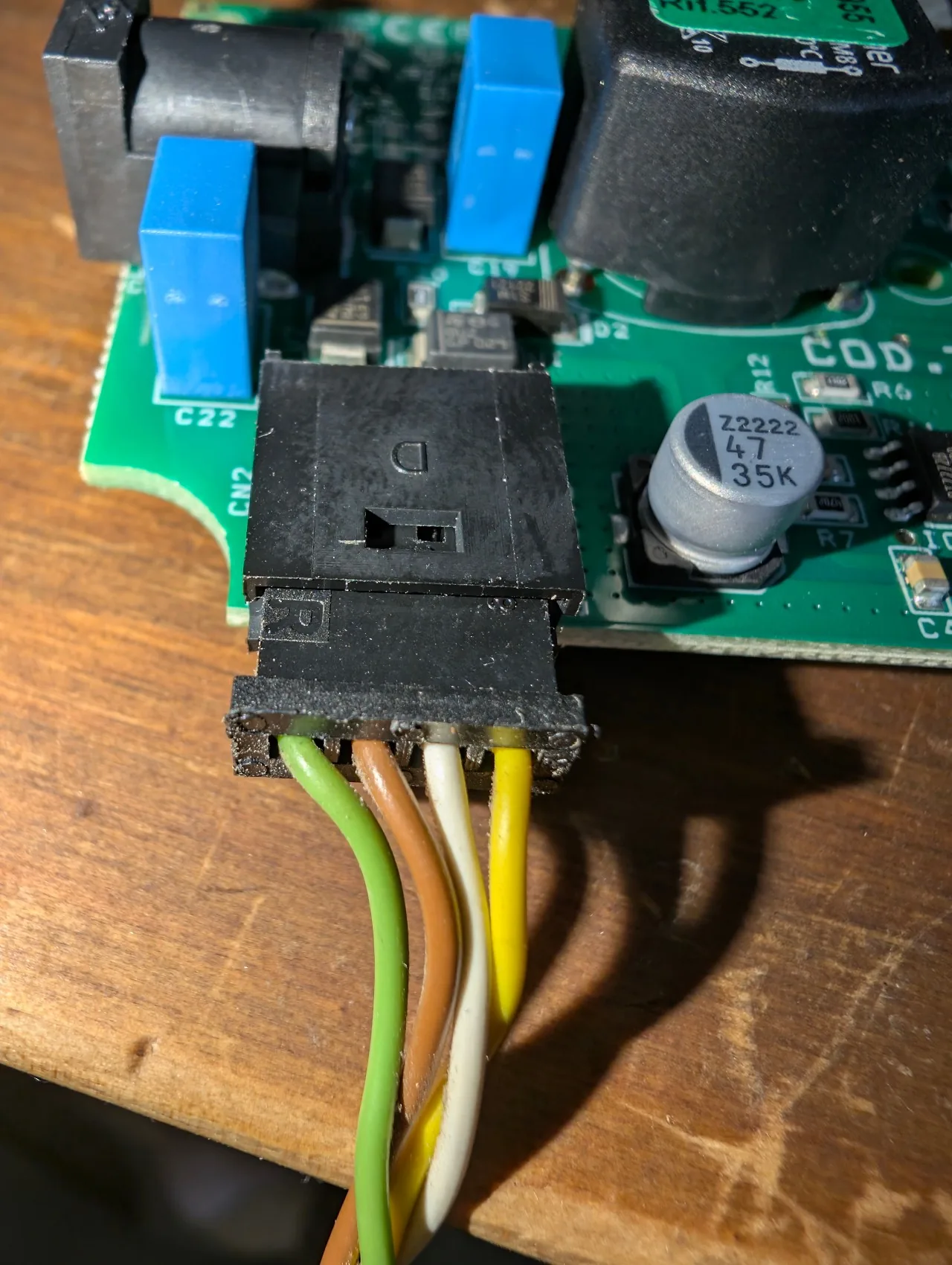
Close-up of the connector alone, cable unplugged, to see the plastic key and the 4 pins in a row:
The other end of the cable plugs into the stove’s TA socket (Termostato Ambiente):
Zoom on the 4 wires leaving the cable just before the TA socket, colour code still readable after a few years of use:
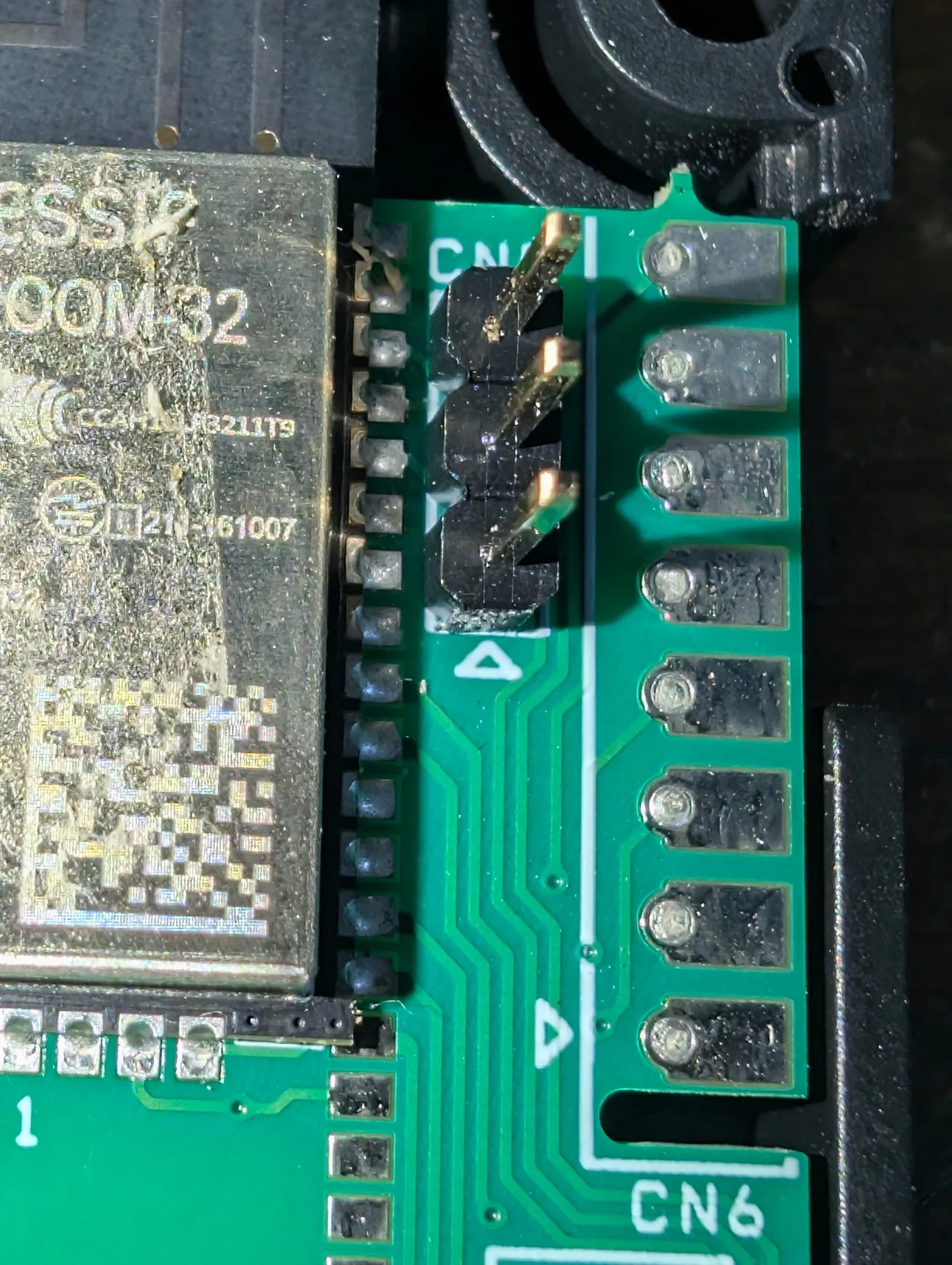
CN5, the 3-pin debug header (the one we dump from):
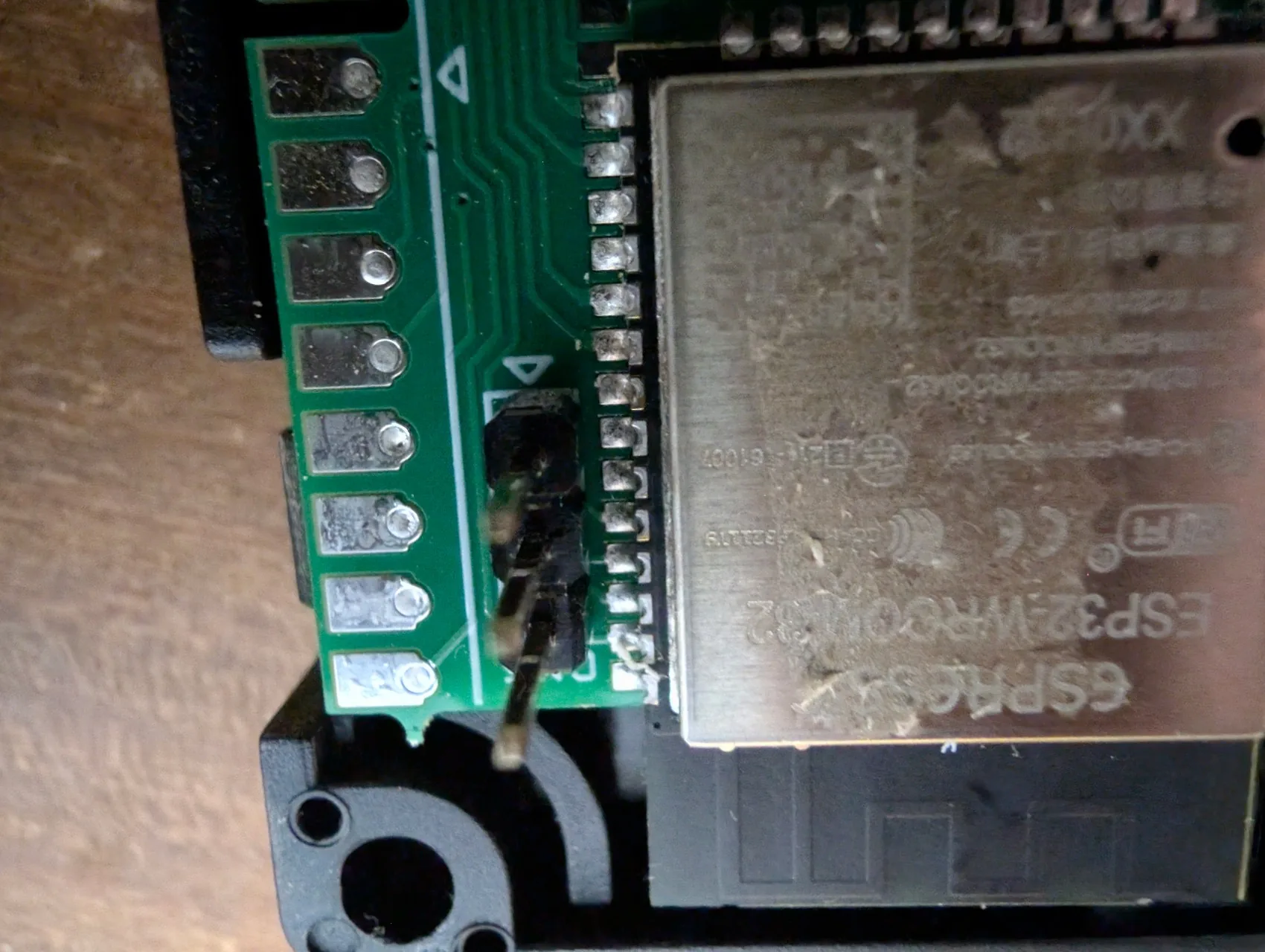
Closer, the CN5 silkscreen is clearly visible right next to the ESP32-WROOM:
And a super macro on the 3 pins themselves (white triangle on the left = pin 1 marker, the GND pin):
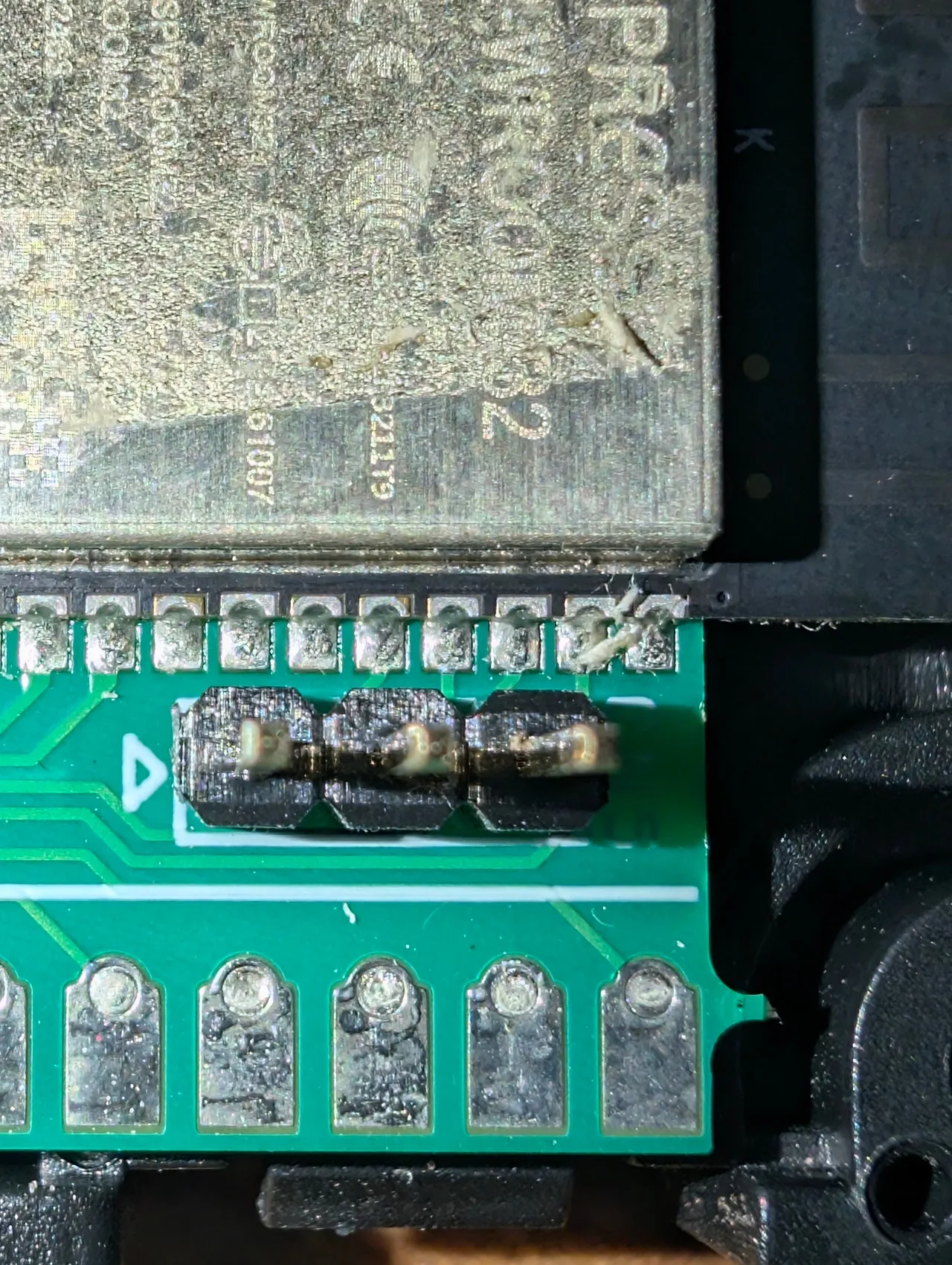
CN5 pinout:
| Pin | Module role | Note |
|---|---|---|
| 1 | GND | pin marked by the silkscreened ▲ triangle |
| 2 | TX | goes to the CH340G’s RXD |
| 3 | RX | receives from the CH340G’s TXD |
Nice surprise of the reverse: the three signals needed for the dump (GND, RX and TX) are already on CN5. Nothing to solder on the PCB.
2. Power the module (with its own supply, not through the CH340G)
The module needs two things at the same time so we can dump it:
- Power, supplied by its original mains adapter (the one that usually powers it when connected to the stove). The module has a dedicated DC jack for this. It stays plugged in for the whole dump.
- A serial link, provided by the CH340G connected to the PC over USB.
Why not power it straight from the CH340G? Because the CH340G can only source a few tens of mA on its 3.3 V rail, while the Extraflame module draws more (internal regulation, LEDs, resistors). In practice: if you remove the original supply and try to power the module from the CH340G’s 3.3 V pin, the module does not start, or starts unreliably. Keep the original adapter plugged in.
Mental picture (what it looks like on the desk):
   230 V mains
       │
       ▼
  ┌─────────┐         ┌──────────────┐
  │ original│ DC jack │              │  3-pin serial connector
  │ power   │────────►│    MODULE    │◄────────────── Dupont ──────┐
  │ adapter │         │  Extraflame  │                              │
  └─────────┘         │              │                              │
                      └──────────────┘                              │
                                                          ┌────────▼────────┐
                                                          │     CH340G      │
                                                          │  (3.3 V mode)   │
                                                          └────────┬────────┘
                                                                   │ USB
                                                                   ▼
PC- Two things connected to the module at once: its original adapter (supplies the power) and the CH340G (reads and writes serial).
- Ground (
GND) must be common to both, which happens automatically as soon as you connect the CH340G’s black wire to pin 1 of the serial connector (that pin is already tied to the module’s common ground, hence to the adapter’s). - The CH340G stays connected to the PC over USB for the whole dump.
3. Wire the CH340G in 3.3 V mode (mandatory)
⚠️ The CH340G must be in 3.3 V mode, otherwise nothing works properly. On most modules there is a jumper to move (a small plastic shunt between two pins), or a solder jumper on the compact models. Some have a mini switch. It is the first thing to check before wiring anything.
(To do: add a photo of the 3.3 V jumper on my CH340G, to be taken at the next teardown.)
What happens when the logic level is wrong:
- CH340G at 5 V: the 3 LEDs on the right of the module stay lit permanently, no usable data comes back. A tell-tale you see immediately: if those 3 LEDs are lit after a reset, cut everything and check your jumper.
- CH340G at 3.3 V: no LED lit in download mode, the serial trace is clean.
Three female Dupont wires for the UART (plus a 4th for IO0↔GND, detailed in step 4):
| CH340G | CN5 pin | Wire in my photo (adapt to your kit) |
|---|---|---|
GND | 1 (module GND) | red |
RXD | 2 (module TX) | yellow |
TXD | 3 (module RX) | blue |
⚠️ Classic UART crossover: the CH340G’s TXD goes to the module’s RX, the CH340G’s RXD goes to the module’s TX. It is trap number one in TTL serial. Just remember that TX talks to RX and vice versa.
Push the female Dupont wires straight into the module’s connector. They hold by themselves.
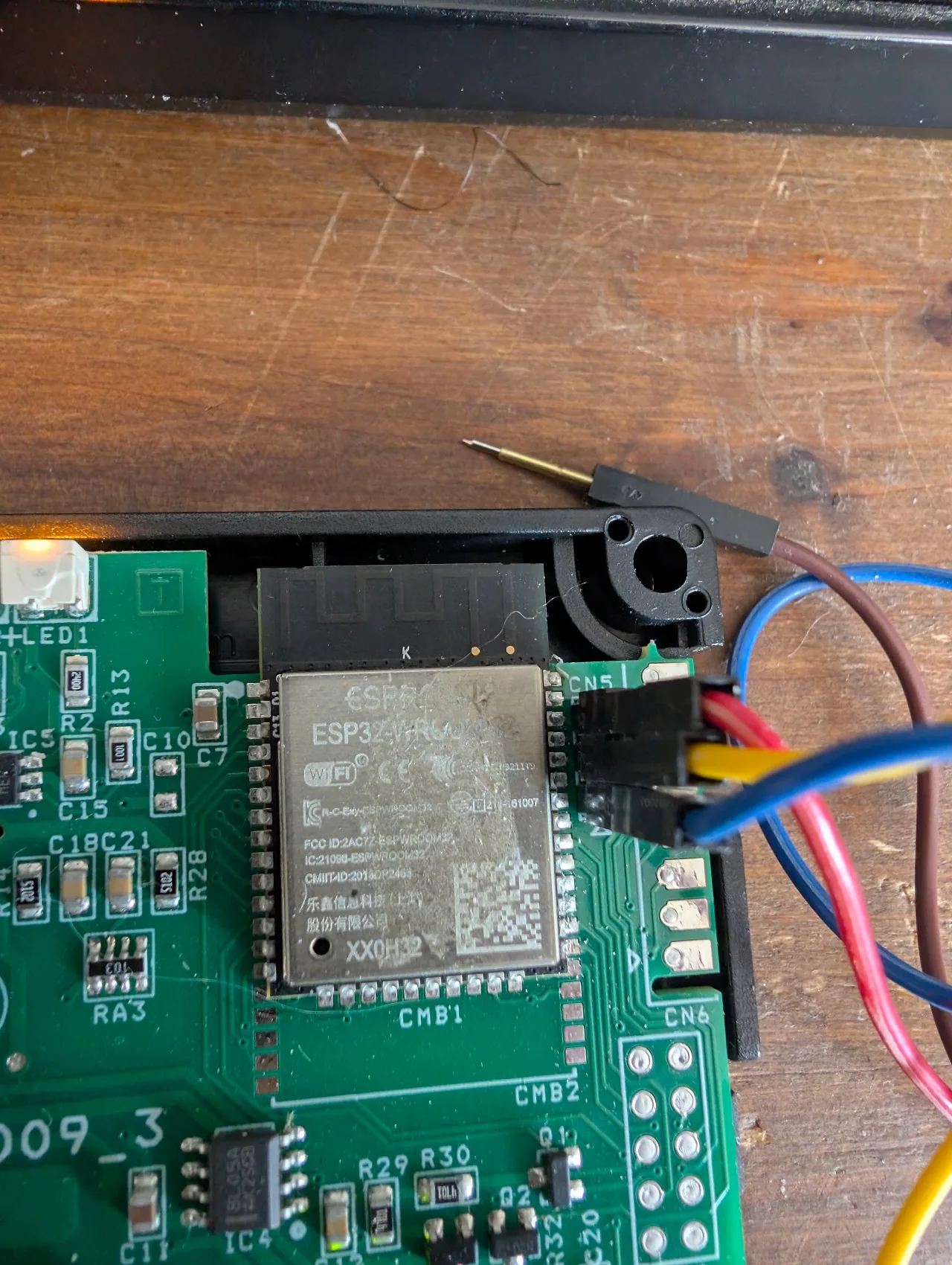
Overview of the setup with both sources connected in parallel: the DC jack of the original adapter (black cable entering the module from below), and the CH340G on USB-C (on the right) bringing the serial link through the 3 red/yellow/blue Dupont wires (same colours on both ends, no visual crossover to remember).
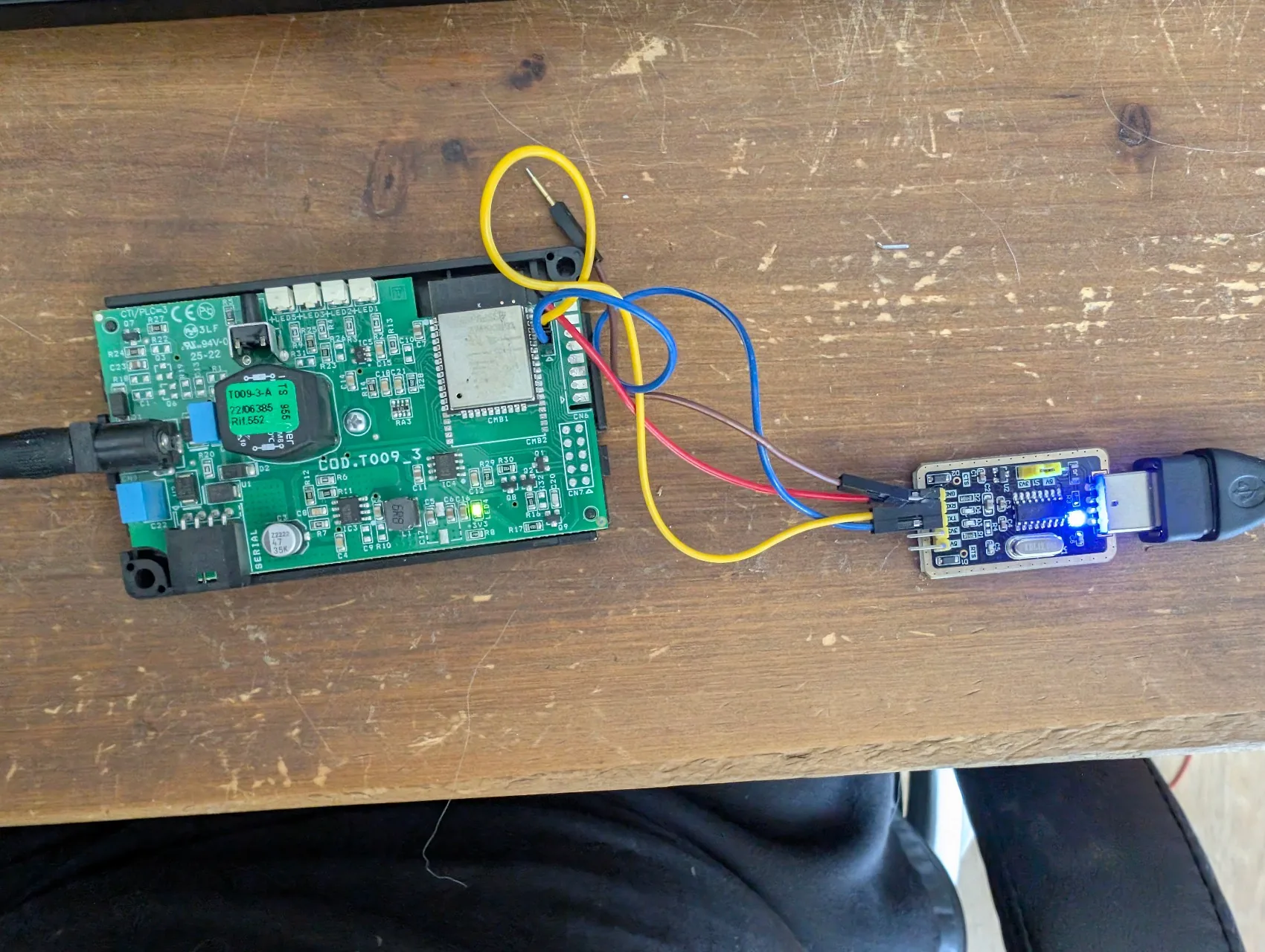
First test before reaching for esptool: open a serial monitor on the CH340G (screen /dev/ttyUSB0 115200 on Linux, PuTTY on Windows in Serial mode, COM3 at 115200 8N1), then unplug and replug the module’s power while keeping the IO0↔GND wire of step 4 held in place.
What I actually saw scrolling in the monitor on the first successful attempt:
rst:0x1 (POWERON_RESET),boot:0x3 (DOWNLOAD_BOOT(UART0/UART1/SDIO_REI_REO_V2))
waiting for download
Two lines only, then silence. That is the ESP32 ROM bootloader saying “I am in download mode, send your commands”. On another reset I also saw the equivalent code boot:0xf (uart_boot(uart0)); the ESP32 varies with the OTP configuration and the chip revision, and both mean the same thing: download mode ready.
Symptoms seen when the wiring was wrong:
- 3 LEDs on the right of the module lit permanently after power-on: CH340G jumper at 5 V instead of 3.3 V. That is what I had on the first try. Fix it before anything else, or the chip may be damaged.
boot:0x13 SPI_FAST_FLASH_BOOTthen the Extraflame logs scroll:IO0was not atGNDduring the reset. The original firmware starts normally. Cut the power again, this time holdingIO0↔GND.- Completely empty serial monitor: CH340G RX not connected, ground not common, or module not powered. Check every wire.
Once the two lines boot:0x3 and waiting for download show up, quit the serial monitor (Ctrl-A K in screen, close PuTTY on Windows) to free the COM3 / /dev/ttyUSB0 port, then run esptool (next step).
4. Put the module into “download” mode (IO0↔GND wire required)
To flash or dump an ESP32, it has to boot in download mode (instead of the normal mode that starts the firmware). On most consumer ESP32 boards (NodeMCU, WROOM devkits, and so on) there is a BOOT button to press during the reset: that button ties a special ESP32 pin (GPIO0) to ground, which tells the chip “no firmware, enter download mode”.
On the Extraflame module, no BOOT button is wired and GPIO0 is not exposed on a header. So you need to put an extra Dupont wire directly on the IO0 pad of the ESP32-WROOM and hold it against GND during the reset. Without it, the module boots normally (boot:0x13 SPI_FAST_FLASH_BOOT) and the Extraflame firmware starts: esptool cannot talk to it.
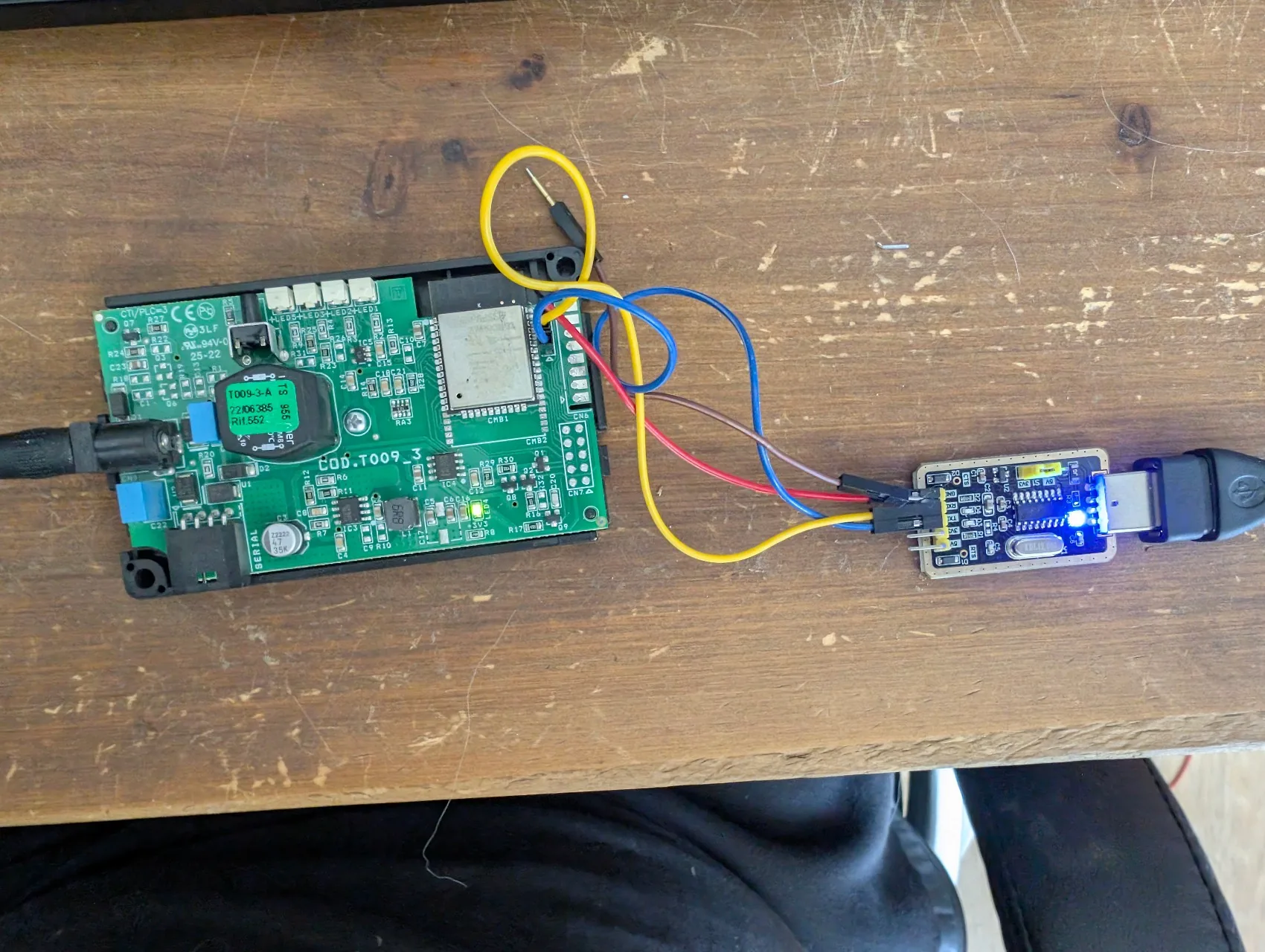
Zoom on the exact move: the male Dupont pin of the yellow wire is placed against the IO0 pad of the ESP32-WROOM32 (flush with the left side of the chip), and the other end of the same wire is pushed into pin 1 (GND) of the CN5/CN6 connector at the bottom left. It is a temporary contact, you can hold it by hand during the hard reset.
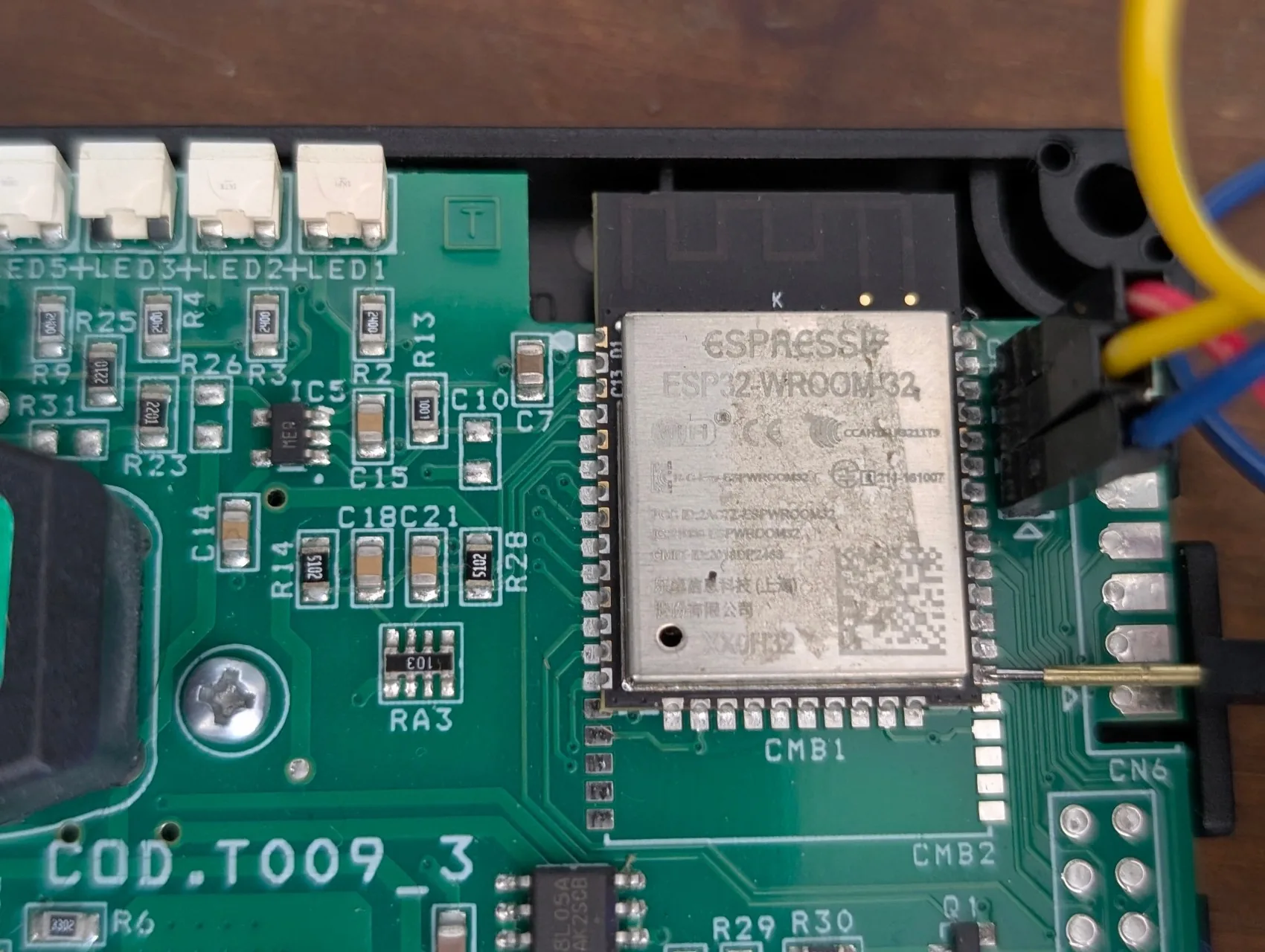
In practice, to enter download mode with this module:
- The CH340G is connected in 3.3 V mode to CN5 for the 3 UART signals (step 3 done).
- Add a 4th Dupont wire: one end placed and held on the
IO0pad of the ESP32-WROOM (at the edge of the chip), the other tied toGND(the rail shared with CN5 pin 1, or any other ground point on the PCB). - The serial monitor is closed (
COM3//dev/ttyUSB0free). - Keeping
IO0held atGND, unplug and replug the module’s original power adapter (hard reset). - Check in the serial monitor that the line
boot:0x3 (DOWNLOAD_BOOT…)(or the equivalentboot:0xf uart_boot) and thenwaiting for downloadappear. Once that trace is seen, you can release theIO0wire: the chip stays in download mode until the next power cut. - The module is ready for
esptool.
Symptom if you forget the IO0 wire: you see boot:0x13 SPI_FAST_FLASH_BOOT and then the Extraflame Black Label T009_3 firmware boot logs scroll. Download mode was not armed. Cut the power again, holding IO0 at GND this time.
5. The complete boot log of the original firmware
If you forget the IO0 wire during the reset (or just out of curiosity), the module boots normally and the Extraflame firmware scrolls in the serial monitor. That log is valuable: it reveals the ESP-IDF version used, the partition table and the application task names, all without opening Ghidra.
Normal boot mode (boot:0x13 SPI_FAST_FLASH_BOOT, Extraflame firmware starting):
$ screen /dev/ttyUSB0 115200
rst:0x1 (POWERON_RESET),boot:0x13 (SPI_FAST_FLASH_BOOT)
configsip: 0, SPIWP:0xee
clk_drv:0x00,q_drv:0x00,d_drv:0x00,cs0_drv:0x00,hd_drv:0x00,wp_drv:0x00
mode:DIO, clock div:2
load:0x3fff0018,len:4
load:0x3fff001c,len:5992
load:0x40078000,len:14352
load:0x40080400,len:3648
entry 0x400806a4
I (30) boot: ESP-IDF v4.3-dirty 2nd stage bootloader
I (30) boot: compile time 09:14:41
I (30) boot: Enabling RNG early entropy source...
I (35) boot: SPI Speed      : 40MHz
I (39) boot: SPI Mode       : DIO
I (43) boot: SPI Flash Size : 4MB
I (47) boot: Partition Table:
I (51) boot: ## Label            Usage          Type ST Offset   Length
I (58) boot:  0 nvs              WiFi data        01 02 00009000 00005000
I (66) boot:  1 otadata          OTA data         01 00 0000e000 00002000
I (73) boot:  2 phy_init         RF data          01 01 00010000 00001000
I (81) boot:  3 factory          factory app      00 00 00020000 00180000
I (88) boot:  4 ota_0            OTA app          00 10 001a0000 00180000
I (96) boot:  5 ota_1            OTA app          00 11 00320000 00080000
I (103) boot:  6 nvs_key          NVS keys         01 04 003a0000 00001000
I (111) boot: End of partition table
I (115) esp_image: segment 0: paddr=0001a020 vaddr=3f400020 size=1c1e8h
I (2100) cpu_start: Starting scheduler on APP CPU.
I (2110) MAIN: Extraflame Black Label T009_3 firmware boot
I (2110) MAIN: Loading credentials from NVS...
I (2120) MAIN: secure_code loaded, stove_model loaded
I (2130) WIFI: STA connecting to SSID '<configured>'...
I (2140) MICRONOVA: UART_INIT: SERIAL_UART, 38400 bps, 8N1
These are native ESP-IDF logs (“I (millis) TAG: message” format), not ESPHome logs. The Extraflame application uses the Espressif logging API directly.
This output is valuable:
- It confirms the boot mode (
boot:0x13= normal SPI flash,boot:0xf= UART download) - It reveals the ESP-IDF version (
v4.3-dirty= v4.3 base plus proprietary patches) - It lists the partition table in clear (no need to rebuild it from the dump)
- It shows the application logs (task names, events) that help map the firmware
Accidental reset before flashing (a risk to know): if you are in boot mode and press reset, the ESP32 falls back to the ROM UART bootloader after a few seconds (waiting for download shows up again). As long as the CH340G stays properly connected, you can run esptool.py as many times as you like.
Firmware extraction
Wiring in place, UART boot mode confirmed (boot:0x3 DOWNLOAD_BOOT then waiting for download in the serial monitor), we can move on to esptool. Real session under Windows PowerShell, done with esptool 5.3 installed through pip:
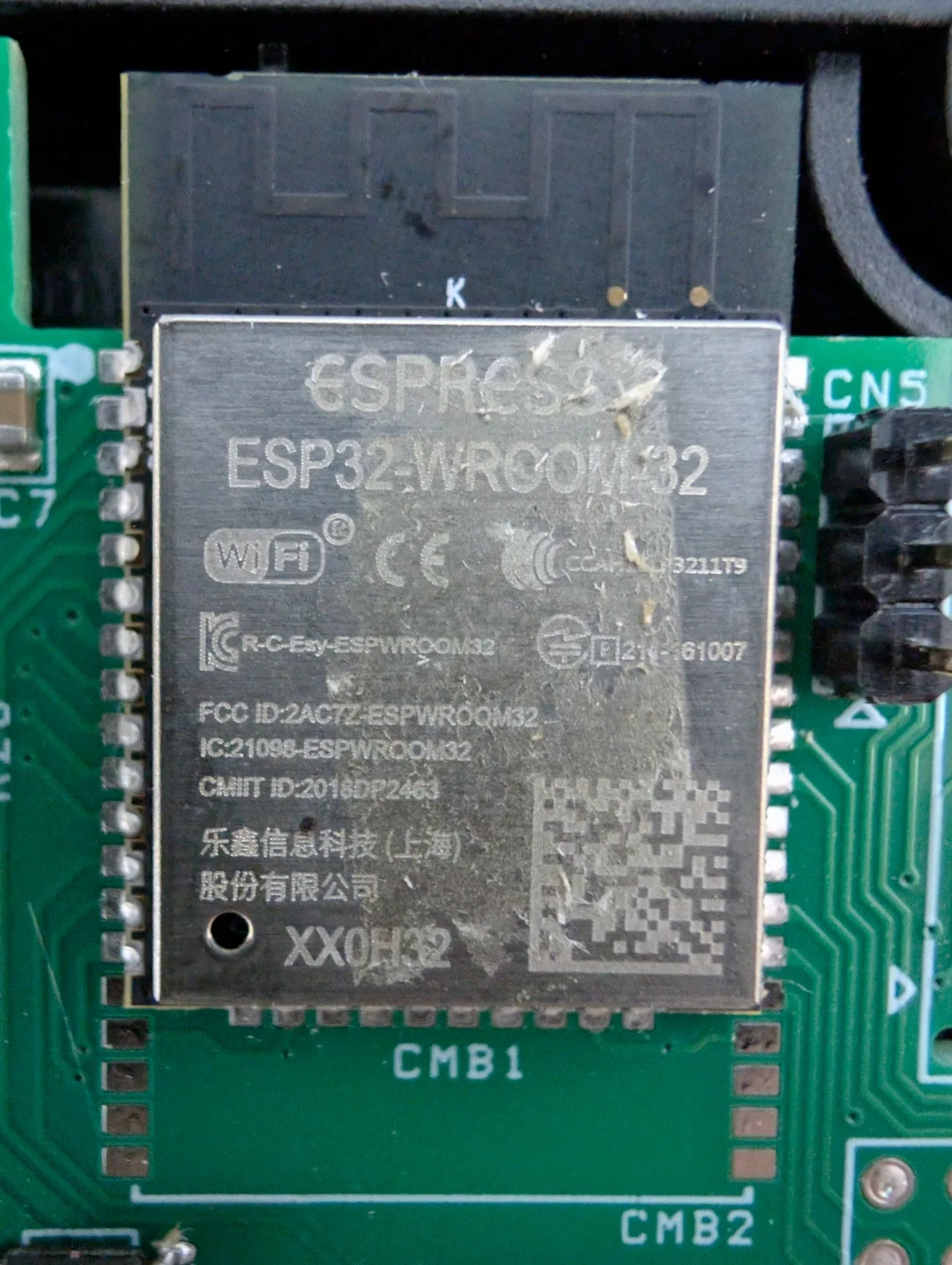
Step A: identify the chip (confirms the serial connection works):
My real session, warnings included (I was used to the old chip_id syntax with no_reset, esptool v5 politely reminds me):
PS> python -m esptool --port COM3 --baud 115200 --before no_reset --after no_reset chip_id

Warning: Deprecated: Choice 'no_reset' for option '--before' is deprecated. Use 'no-reset' instead.
Warning: Deprecated: Choice 'no_reset' for option '--after' is deprecated. Use 'no-reset' instead.
Warning: Deprecated: Command 'chip_id' is deprecated. Use 'chip-id' instead.
esptool v5.3.0
Note: Pre-connection option "no-reset" was selected. Connection may fail
if the chip is not in bootloader or flasher stub mode.
Connected to ESP32 on COM3:
Chip type:          ESP32-D0WDQ6 (revision v1.0)
Features:           Wi-Fi, BT, Dual Core + LP Core, 240MHz,
                    Vref calibration in eFuse, Coding Scheme None
Crystal frequency:  40MHz
MAC:                4c:eb:d6:xx:xx:xx

Stub flasher running.

Warning: ESP32 has no chip ID. Reading MAC address instead.
MAC:                4c:eb:d6:xx:xx:xx

Staying in bootloader.
PS>
Three things to note in this output:
- The three
Warning: Deprecated:lines are plain compatibility warnings.esptoolv5 still acceptsno_reset(with an underscore) andchip_id(with an underscore) but recommends the new formsno-resetandchip-id(with hyphens). In the rest of the article I use the new forms directly, but the old ones still work. - The
ESP32 has no chip ID. Reading MAC address instead.warning is normal on ESP32: thechip-idcommand is a leftover from older chip generations. On ESP32,esptoolfalls back to the MAC address, which is plenty to confirm the chip is identified and the connection works. Staying in bootloader.confirms that after the command the chip stayed in download mode (thanks to--after no-reset). So we can chain the next command (espefuse, thenread-flash) without cutting the power.
The --before no-reset --after no-reset options are critical in our setup: by default esptool tries to reset the chip through DTR/RTS, but our Extraflame module is already in download mode by itself. If it attempts a reset, we leave the mode and have to cut the power again.
Chip identified: ESP32-D0WDQ6 revision v1.0, MAC 4c:eb:d6:xx:xx:xx.
Check that the firmware is not encrypted (critical step). Before dumping, we want to know whether the flash content is in clear or encrypted with Flash Encryption (an Espressif protection where every flash block is encrypted with a key stored in the eFuses, unreadable without that key). If it is encrypted, a dump is useless: we would get binary noise.
The espefuse summary command reads the chip’s eFuses and shows the state of every protection:
PS> python -m espefuse --port COM3 summary

espefuse v5.3.0
Connected to ESP32 on COM3:
Chip type:          ESP32-D0WDQ6 (revision v1.0)

Flash fuses:
FLASH_CRYPT_CNT (BLOCK0)     Flash encryption is enabled if this
                             field has an odd number of bits set  = 0 R/W (0b0000000)
FLASH_CRYPT_CONFIG (BLOCK0)  Flash encryption config              = 0 R/W (0x0)

Security fuses:
UART_DOWNLOAD_DIS (BLOCK0)   Disable UART download mode           = False R/W (0b0)
ABS_DONE_0 (BLOCK0)          Secure boot V1 is enabled            = False R/W (0b0)
ABS_DONE_1 (BLOCK0)          Secure boot V2 is enabled            = False R/W (0b0)
JTAG_DISABLE (BLOCK0)        Disable JTAG                         = False R/W (0b0)
Everything we want to see in this report:
FLASH_CRYPT_CNT = 0(even number of bits set): the flash is in clear, we can dump it as isABS_DONE_0 = FalseandABS_DONE_1 = False: Secure Boot disabled, no signature to validateUART_DOWNLOAD_DIS = False: UART download mode allowed, we can flash and dump withesptoolJTAG_DISABLE = False: JTAG also reachable if we ever need it
Extraflame enabled none of the protections on this module, probably because the secure_code and stove_model in the NVS are enough for their cloud pairing logic, and securing the flash would have complicated their OTA. A gift for us: the dump will give a binary that can be analysed directly.
Had any of those flags been True, the story would have been very different (a hardware attack with a ChipWhisperer at about 2,000 €, or giving up).
Step B: full 4 MB dump at 460,800 baud:
PS> python -m esptool --port COM3 --baud 460800 --before no-reset --after no-reset read-flash 0 0x400000 ~\Desktop\extraflame_dump.bin

esptool v5.3.0
Connected to ESP32 on COM3:
Chip type:          ESP32-D0WDQ6 (revision v1.0)
MAC:                4c:eb:d6:xx:xx:xx

Stub flasher running.
Changing baud rate to 460800...
Changed.

Configuring flash size...
Read 4194304 bytes from 0x00000000 in 100.1 seconds (335.3 kbit/s)
to '~\Desktop\extraflame_dump.bin'.

Staying in bootloader.
4,194,304 bytes (exactly 4 MB) extracted in 100.1 seconds at 335 kbit/s. The final Staying in bootloader confirms the chip stayed in download mode (thanks to --after no-reset); another command could follow without cutting the power.
Immediate backup before any manipulation: copy of extraflame_dump.bin to the NAS plus a USB stick. The rule is simple: never touch the original dump, always work on copies.
Note for Linux and macOS users: the commands are identical, except the port name (/dev/ttyUSB0 instead of COM3) and the destination path (~/Desktop/extraflame_dump.bin).
Analysis
Partition analysis
Classic ESP-IDF layout with two OTA partitions:
# Name,   Type, SubType,  Offset,   Size
nvs,      data, nvs,      0x9000,   0x5000
otadata,  data, ota,      0xe000,   0x2000
app0,     app,  ota_0,    0x10000,  0x180000
app1,     app,  ota_1,    0x190000, 0x180000
spiffs,   data, spiffs,   0x310000, 0xE0000
nvs_key,  data, nvs_keys, 0x3F0000, 0x1000
String extraction
The old reflex before Ghidra: strings on ota0. In 60 key lines:
- Framework: ESP-IDF v4.3-dirty
- Cloud backend:
mqtt.extraflame.it - Wi-Fi manager:
tonyp7/esp32-wifi-manager - Micronova UART: 38400 bps 8N1
- RAM_ registers:
ACCENDI, SPEGNI, TAMB, TFUMI, TH2O, STATO, ALLARME - Revealing log: “Waiting for Micronova master idle…”, a strong hint that the module listens
Omnyvore cloud backend
The strings also reveal the backend that talks to the Total Control 2 app: mqtt.extraflame.it:8883 (TLS MQTT broker), operated by the Italian company Omnyvore srl. Every Black Label module authenticates with this broker using two values stored in the secret1 NVS partition:
secure_code(8 digits, pairing code used as MQTT username and password)stove_model(10 digits, the Extraflame model identifier at Omnyvore)
The firmware also embeds an X.509 CA certificate used to validate mqtt.extraflame.it over TLS. Certificate analysis:
Subject : /C=IT/ST=Vicenza/L=Vicenza/O=Omnyvore/OU=Tech Ops/CN=omnyvore.com
Issuer  : same (self-signed)
Valid   : 2017 -> 2027
It is a self-signed CA whose private key stays at Omnyvore. That detail closes the door on the “local fake MQTT cloud without touching the module” idea:
- Signing a server certificate for
mqtt.extraflame.itwith this CA requires the CA’s private key, which we do not have and will not get (absent from the firmware, absent from the public MQTT server, kept offline at Omnyvore). - Redirecting
mqtt.extraflame.itby DNS to a local Mosquitto without touching the module makes the TLS handshake fail on the module side: the local certificate is not signed by the embedded CA. - Allowing a local certificate in the module means modifying the NVS or the firmware, so we might as well replace the whole MQTT layer directly.
Verdict: no clean fake cloud is possible without reflashing the module. In other words, if Omnyvore shuts down tomorrow, no DNS trick will save a module left on the original firmware. The only lasting way is the custom firmware (this project), which replaces the MQTT layer and leaves the Omnyvore loop once and for all.
The survival stake is real: if Omnyvore closes tomorrow (a small company, no service guarantee), every Extraflame sold since 2018 loses its remote control. A local firmware is also long-term insurance for the installed base.
Ghidra decompilation
Ghidra 12.x supports Xtensa natively (the processor of classic ESP32s), no more community plugin needed. Trick to recover ESP-IDF symbols: functions log their own name through ESP_LOGx(). If the string “uart_set_pin” is referenced by a function, that function IS uart_set_pin. That is anchoring by log strings.
Key functions located:
gpio_set_level      @ 0x400d98f4
uart_set_pin        @ 0x400d8740
uart_param_config   @ 0x400d88f4
uart_driver_install @ 0x400d90fc
uart_write_bytes    @ 0x400d8be8
uart_read_bytes     @ 0x400d8c64
QEMU emulation plus GDB
Rather than risking a brick on the real hardware, boot the firmware under QEMU-Xtensa and capture the low-level calls through GDB remote.
(gdb) break *0x400d8740        # uart_set_pin
(gdb) continue

Breakpoint hit at 0x400d8740
  a2 (uart_num) = 0x1
  a3 (tx_pin)   = 0x17    ; = GPIO 23
  a4 (rx_pin)   = 0x5     ; = GPIO 5
Result captured without opening the module:
- Micronova UART:
UART_NUM_1, TX=GPIO_NUM_23, RX=GPIO_NUM_5, 38400 8N1 - 4 active GPIOs on the 4 panel LEDs:
25, 26, 32, 33(a 5th GPIO, 22, also toggles at boot; it belongs to the reset button, not to an extra LED visible on the module’s face)
Mapping the 4 LEDs
By cross-checking the runtime logs with the meaning of the Extraflame LEDs (the user manual names POWER, BLE, WI-FI, SERVER), and confirming every bit in the breakpoints on gpio_set_level(), we get the following mapping:
The module has 4 white SMD LEDs and 1 tactile reset button, nothing else on the front. The mapping:
| LED silkscreen | ESP32 GPIO | Original role |
|---|---|---|
POWER | GPIO 25 | lit as long as the module is powered |
BLE | GPIO 26 | Bluetooth (provisioning through the Total Control app) |
WI-FI | GPIO 32 | STA connected to the router |
SERVER | GPIO 33 | Omnyvore MQTT cloud connection active |
Active high (gpio_set_level(pin, 1) lights the LED, confirmed by the patterns observed in QEMU at boot).
The 5th GPIO toggling in QEMU (GPIO 22) is the reset button, not a hidden LED: its direction is an input with a pull-up handled by the firmware, which looks like an output from the breakpoint’s point of view but has nothing to do with a light source.
The custom firmware reuses the same 4 LEDs with their original meaning (POWER always on, WIFI while STA is up, SERVER when MQTT to the local Mosquitto is up, BLE in SoftAP provisioning mode). A user who reflashes the module keeps a set of LEDs that makes sense, rather than an unreadable home-made pattern.
A first round of smoke: QEMU with no stove in front
Before having access to the real bus, I set breakpoints on the 2 functions in QEMU and let it run for 60 seconds:
(gdb) shell grep -c "READ hit" trace.log
706
(gdb) shell grep -c "WRITE hit" trace.log
0
706 reads for 0 writes. At first I thought the module was listening passively (a slave, waiting for the stove to talk). That was a partial reading: with no stove in front on the QEMU side, every uart_read returns empty, which looks like “passive listening” when in truth the module simply has nothing to decode. The full reverse plus the field contradict that interpretation: the module is the RWMS master, it polls actively, exactly like the community implementations (philibertc/micronova_controller, Jorre05/micronova, agua-iot). Details in the protocol section below.
The Micronova protocol, register side
Micronova is a generic mainboard used by several Italian pellet stove brands (Extraflame, EdilKamin, LAMINOX, Freepoint, Karmek One). After Ghidra reverse of the original firmware plus live validation on my Teodora Evo I_VENT, here is the real physical and logical layer of the bus:
Physical layer (to be respected in code, otherwise the board stays silent):
- UART1, 1200 baud, 8N2, no flow control.
- Line inversion required:
uart_set_line_inverse(UART1, UART_SIGNAL_RXD_INV | UART_SIGNAL_TXD_INV)(mask0x24). The bus uses RS-232 polarity at TTL levels, with no physical converter. Without inversion, RX cannot be decoded. - The
38400 8N1visible in the boot log belongs to the SOTA2 channel (the separate protocol used to reflash the stove’s firmware), not to telemetry. - Half-duplex bus on a single wire: every byte sent is heard back as an echo, to be skipped when decoding.
Role: the Wi-Fi module is the RWMS master (Read/Write Micronova Serial). It polls the stove cyclically, the stove answers. Passive listening yields 0 frames.
Frame format (RWMS protocol, additive checksum):
- Read:
[loc][addr](2 bytes) →[checksum][value](2 bytes) - Write:
[loc][addr][value][checksum](4 bytes) →[checksum][value](2 bytes) locencodes the mode:0x00= read RAM,0x20= read EEPROM,0x80= write RAM,0xA0= write EEPROM (bit 5 for EEPROM, bit 7 for write).checksum = (loc + addr + value) & 0xFF(a sum, not a complement).
Register addresses (standard Micronova, documented by the community and validated empirically on the Teodora Evo):
| Address | Register | Direction | Encoding |
|---|---|---|---|
0x01 | ambient temp | read | °C × 2 (raw / 2 for °C) |
0x03 | water temp | read | °C × 2 (absent on air models) |
0x21 | stove state | read/write | 0=OFF 1=Start 4=WORK 7=Standby 8=Alarm |
0x34 | flame power | read | % |
0x3C | water pressure | read | bar × 10 |
0x3E | fumes temp | read | °C raw |
0x7D | temp setpoint | read/write | °C |
0x7F | power setpoint | read/write | step 1..5 |
0x9D | temp active | read | °C |
0x9F | power active | read | step 1..5 |
Commands = writes to register 0x21:
[0x80, 0x21, 0x01, 0xA2]= turn on[0x80, 0x21, 0x06, 0xA7]= turn off[0x80, 0x21, 0x00, 0xA1]= reset alarm
Reference document kept in sync with the firmware: docs/PROTOCOLE-MICRONOVA.md in the GitHub repo also covers the full SOTA2 protocol (SLIP framing, 8-byte esptool header, SYNC handshake, opcode table 0x02..0xDE), the state machine, the retry timings, the chrono and date EEPROM registers, and the reverse points still open.
Stove families: the original firmware handles several types through stove_type_t (I_CALD boiler, I_IDRO hydro, I_VENT air, plus variants 2/3/4/5). OpenXtraflame keeps the type at boot from the secret1 partition of the original dump, to stay compatible with the same registers filled by the stove.
Firmware
Custom firmware
The OpenXtraflame firmware implements today:
- A master polling loop on UART1 at 1200 8N2 inverted, which polls the stove cyclically and parses the
[checksum, value]answers with additive verification. - A RAM shadow that mirrors the state of the standard Micronova registers (
STOVE_STATE 0x21,TAMB 0x01,FUMES_TEMP 0x3E,POWER_GET 0x9F,TEMP_GET 0x9D, and so on). - A minimal MQTT bridge: periodic publish of a JSON on
<prefix>/<stove>/state(state, power, alarm, temperatures) plus subscription to the command topicscmd/on,cmd/off,cmd/setpoint,cmd/power,cmd/reset_alarm. Every command writes into the RAM shadow, the stove reads it at its next poll. - An embedded web UI for Wi-Fi and Mosquitto configuration at first boot in SoftAP mode
openextraflame_XXXX, then reachable in STA.
Still to write:
- Automatic publication of the Home Assistant MQTT Discovery topics (the
mqtt_bridge_publish_discovery()hook exists and will be called onMQTT_EVENT_CONNECTED, but its payload is still aTODO). - Optional Guardian mode that archives the official Extraflame OTAs on the LAN side (a safety net if Omnyvore disappears along the way).
QEMU validation
QEMU-Xtensa boots OpenXtraflame. UART0 = console, UART1 = TCP socket 4449 simulating the Micronova bus. A Python simulator plays the master.
[Master] Test 1 - Read RAM_TAMB (0x30)
  TX: 00 30
  RX: 00 ff                → value=0, checksum ok ✓
[Master] Test 2 - Write RAM_TAMB (0x30) = 42
  TX: b0 2a d5
  RX: 2a d5                → ACK ok, value written ✓
[Master] Test 3 - Re-read RAM_TAMB (0x30)
  TX: 00 30
  RX: 2a d5                → value=42, RAM shadow persists ✓
3 critical validation points confirmed: register addressing, frame format, UART timing.
Flash
Preliminary test on the M5Stack ATOM Lite (External target)
Before reflashing the original module, the whole firmware chain is validated on an M5Stack ATOM Lite (ESP32-PICO in a finished case, about 12 €, External target, TARGET=external). Wiring:
GPIO 17(STOVE_UART_TX_PIN) to the stove’sRXGPIO 16(STOVE_UART_RX_PIN) to the stove’sTX- common
GND
With the stove physically next to it, it can also be stubbed with a simple Python script playing the Micronova master on /dev/ttyUSB1 (the one from the QEMU validation above, reused on real hardware).
Build and flash:
$ idf.py set-target esp32
$ idf.py -DOPENXFLAME_TARGET=external build
$ idf.py -p /dev/ttyUSB0 -b 460800 flash monitor
What I check on the devkit before touching the Black Label:
- SoftAP
openextraflame_XXXXannounced at boot. - Web UI reachable on
http://192.168.4.1/to enter the Wi-Fi SSID and password plus the Mosquitto address. - STA reconnects to the router after a reboot, MQTT publishes on
extraflame/poele/state. - Micronova frames read without checksum errors.
Flashing the Black Label module
Once the External build is validated, same procedure on the original module with OPENXFLAME_TARGET=blacklabel. Two precautions:
- The
extraflame_dump.binsaved at the very beginning stays in the drawer. If anything goes wrong, the factory firmware comes back with a simpleesptool --port COM3 --baud 460800 write-flash 0 extraflame_dump.bin. - The first boot of the custom firmware writes a fresh, empty NVS. The original
secure_codeandstove_modelare lost on the Omnyvore cloud side (unrecoverable, but irrelevant since we will not talk to Omnyvore anymore). They remain in the binary dump, so they come back on a rollback.
$ idf.py -DOPENXFLAME_TARGET=blacklabel build
$ python -m esptool --port COM3 --baud 460800 erase-flash
$ idf.py -p COM3 -b 460800 flash monitor
Plugged back into the stove, the module then shows its 4 LEDs with the new meaning (POWER on, WI-FI in STA once the router is joined, SERVER when the local Mosquitto answers) and the stove appears in Home Assistant through MQTT Discovery.
Useful everyday commands
Once the module is in STA on the network, most operations happen from the web UI, and the CH340G is no longer needed. Here are the most used commands, worth a bookmark.
Follow the firmware logs live (from the PC, module still connected over serial):
python -m serial.tools.miniterm COM3 115200The firmware logs with the classic ESP_LOGI/W/E. Every Micronova frame received plus the Wi-Fi and MQTT events scroll in real time.
Live Micronova log from the browser (once the module is in STA, without the CH340G):
- Web UI → 🔍 Debug tab: ring buffer of the last 64 RX/TX frames with timestamps, refreshed every second. Useful to check that the stove really polls the module.
OTA from a URL (without going through the PC):
- Web UI → ⬆️ OTA tab → paste the URL of the latest GitHub release, according to the target:
https://github.com/Isno-Open/OpenXtraflame/releases/latest/download/openextraflame-blacklabel.binfor the original Black Label module,https://github.com/Isno-Open/OpenXtraflame/releases/latest/download/openextraflame-external.binfor an external ESP32 (M5Stack) → ⬇️ Pull button. Do not mix the two: each target has its own image. - The module downloads it by itself, checks the SHA256 signature, writes into the alternate OTA slot and reboots.
OTA with curl (a script without a browser, useful for CI):
curl -X POST --data-binary @openextraflame.bin \
     -H "Content-Type: application/octet-stream" \
     http://192.168.20.11/ota/upload
Rollback to the previous version (if an OTA introduced a regression):
- Web UI → OTA tab → ↩️ Rollback button. The module re-enables the slot it came from and reboots.
Factory reset (wipe the Wi-Fi and MQTT configuration and go back to the provisioning SoftAP):
- Web UI → ⚙️ Advanced tab → 💥 Factory reset button. Erases the NVS partition but keeps the installed firmware.
Restore the original Extraflame firmware (last resort, with the dump from the beginning):
python -m esptool --port COM3 --baud 460800 write-flash 0 extraflame_dump.binWhat’s next
🎉 RC1 update, night of 8 to 9 July 2026
v0.1.0-rc1 published on GitHub with Blacklabel and External tarballs ready to flash. Since then, v0.1.0-rc3 adds the Maintenance tab, technical parameters Pr01 to Pr30 in read and write, alarm history, hopper refill prediction, and per-target OTA images.
Extraflame Omnyvore cloud reversed end to end (Black Label only):
- Omnyvore CA certificate extracted from the original firmware dump (valid until 2027-10-03), embedded in the firmware
- Auth handshake identified:
client_id = MAC uppercase,username = matricola,password = secure_code, MQTT 3.1.1 - Full topic format found:
omv/ex/{MAC}/{model} 1.8/{matricola}/{IN|OUT|REPLY}/{family}(yes, there is a real space in the path) - Automatic REST login to
appapi.extraflame.it/authwith the user’s TotalControl 2 credentials, fetching the internalstove_idand the real Omnyvorestove_model(different from the NVS stove_model) - Publish OUT:
roomTemp,smokeTemp,power,machineState,targetPower,targetRoomTempevery 30 s - Subscribe IN:
settings(commands sent from the TotalControl 2 app reach the firmware and write the stove’s EEPROM through Micronova) - MQTT REPLY with correlationid for a clean acknowledgement in the Omnyvore protocol
- HA cloud on/off switch, conditional (only shown if a TC2 login is configured)
The official TotalControl 2 app keeps seeing the stove online alongside the local MQTT bridge to HA. Verified end to end: command sent from the mobile app → Extraflame server → our ESP32 firmware → Micronova EEPROM → physical stove.
Safe mode plus boot loop detector:
- 🛟 Enable safe mode + reboot button in the Advanced tab of the web UI (at the next boot, only Wi-Fi, web UI and OTA start, everything else is skipped)
- Automatic detection: 3 consecutive crashes (uptime under 60 s) trigger safe mode by themselves
- The crash counter resets after 60 s of healthy uptime
New HA Discovery sensors: uptime, last boot, cloud enabled/connected, safe mode at next boot.
httpd wildcard fix along the way: POST /api/stove/power/N had always returned 404 (httpd_uri_match_wildcard missing), now OK.
Already in place
- ✅ Firmware validated on the M5Stack ATOM Lite (
OPENXFLAME_TARGET=external) and on the real Black Label module in production - ✅ Wi-Fi provisioning through the
openxtraflame_XXXXSoftAP, then automatic switch to STA - ✅ Embedded web UI with 7 tabs: Dashboard, Wi-Fi, MQTT, Stove, OTA, Debug, Advanced
- ✅ OTA working end to end: direct upload of the
.binfrom the browser, or pull from an HTTPS URL (CA validation through the ESP-IDF Mozilla bundle), with a real-time progress bar (chunk by chunk/ota/statuspolling) - ✅ Automatic wipe of the
phy_initpartition on a firmware version change (avoids an OTA inheriting an invalid RF calibration and getting stuck onreason=210at the next STA) - ✅ Rollback safety:
esp_ota_mark_app_valid_cancel_rollback()on the first successful boot, a buggy firmware rolls back automatically to the previous slot - ✅ Protection against accidental clobbering of the Wi-Fi and MQTT credentials (a save from an unrelated tab no longer overwrites the password with an empty string), explicit
•••••••• (set, leave empty to keep)placeholders on already provisioned password fields - ✅ Polished UI: non-blocking toasts (replacing the native
alert()), custom modal dialogs (instead ofconfirm(), blocked on mobile Chrome), visual progress feedback on every long action - ✅ Live log of the Micronova frames in the Debug tab (64-entry ring buffer, refreshed every second)
- ✅ Home Assistant MQTT Discovery: on the first
MQTT_EVENT_CONNECTED, the module publishes 11 retainedhomeassistant/*topics that auto-provision in HA a singleExtraflame - OpenXtraflame Black Labeldevice with sensors (ambient, fumes and water temperatures, power, state, alarm), anonlinebinary sensor, an on/off switch, an alarm reset button, a setpoint number and a power select - ✅ MQTT Last Will Testament:
<prefix>/availabilityretained atofflineif the module goes down, HA greys the entities instantly - ✅ MQTT broker auto-discovery on the firmware side through mDNS: 🔍 Detect HA button in the MQTT tab that tries
_mqtt._tcp,_home-assistant._tcpandhomeassistant.localin turn, and fills the host and port fields - ✅ OTA images published with every GitHub release, one per target, at stable
releases/latest/download/addresses - ✅ Multicast Zeroconf handled by an mDNS repeater or local routing, depending on your network setup
Done since the first write-up
- The repository is public under the Isno-Open organisation (history cleaned, README rewritten).
- The former
isno.frfirmware mirror is replaced by the GitHub release images above.
Next features
- Optional Guardian mode: silent archiving of the official Extraflame OTAs on a local server (a safety net if Omnyvore ever closes, we keep the factory binaries)
- Support for other Micronova brands: profile dispatcher by
stove_typefor EdilKamin, LAMINOX, Freepoint, Karmek One (the protocol is the same, only the RAM mapping sometimes differs)
Parts
- ◨Extraflame Black Label Wi-Fi module 289 € incl. VAT
The original module to reverse. Shipped with the stove, or sold as a spare part.
-
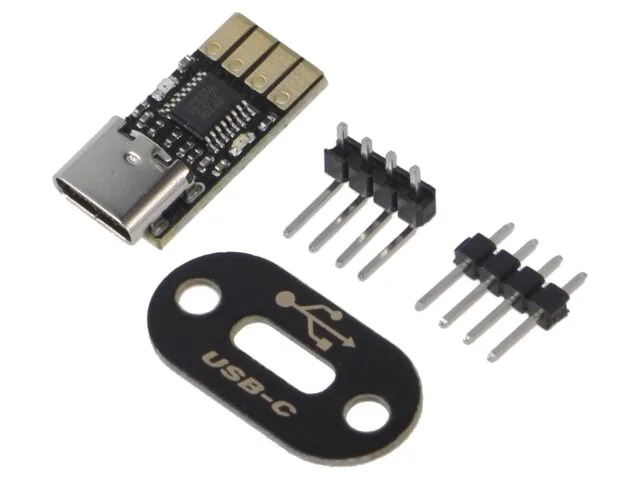 Mini USB-UART adapter (Kamami) 15.90 EUR
Mini USB-to-TTL-serial converter module (Kamami), to flash and debug a microcontroller such as an ESP32.
- ◨
3.3 V / 5 V serial interface to flash and dump the ESP32. Make sure it is set to 3.3 V. This is what the original build uses.
- ◨
To hook the CH340G to the ESP32 pins quickly, without soldering. 40-wire kit.
-
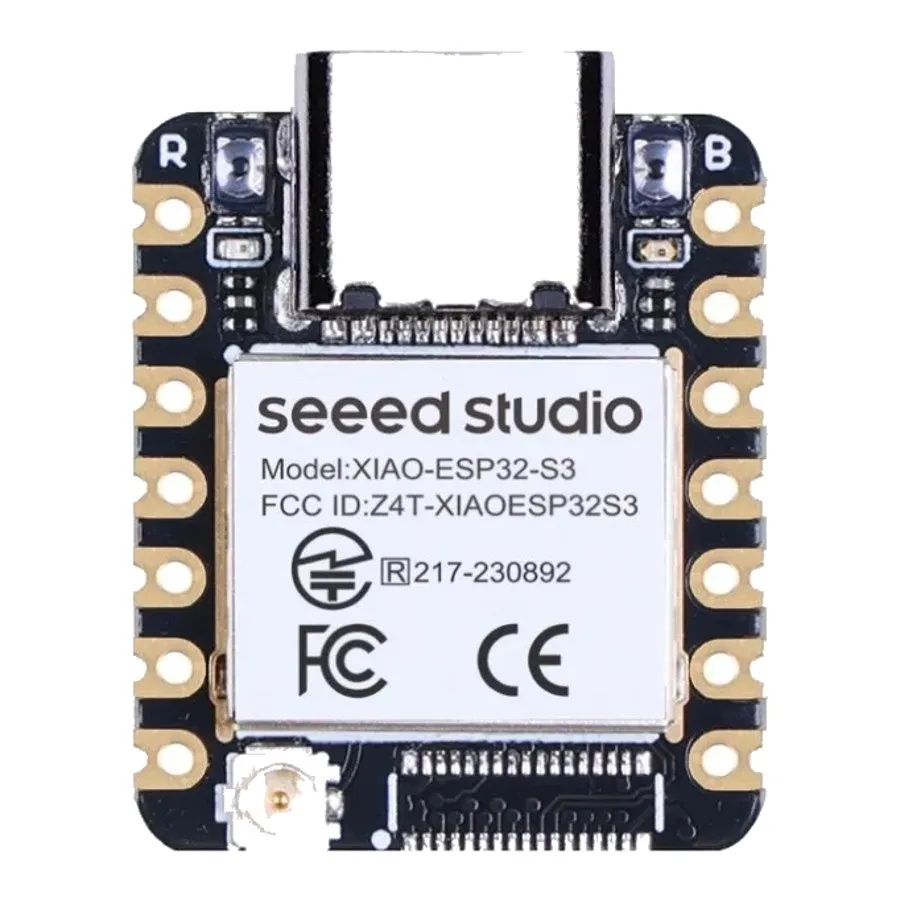 Seeed XIAO ESP32-S3 board 22.90 EUR
XIAO board built on ESP32-S3: dual core, Wi-Fi and BLE 5, external antenna connector, and enough power for a small on-device model.
- ◨Electrician's tape (optional) ~3 €
To hold a Dupont wire against pin 2 during the read. Not required, holding it by hand works too.
Amazon / hardware store
Prices as observed at the time of the project. No affiliate links, I earn nothing.